Extending Oracle APEX Universal Theme with a Scalable Design System
Oracle APEX comes with something very powerful out of the box: Universal Theme.
It is responsive, accessible, stable, and production ready. For most developers, this is perfect. You can create forms, reports, dashboards, and workflows without worrying about UI breaking on different screens. Everything just works.
And that’s exactly where the problem starts.
Because when everything “just works,” most APEX applications also end up looking exactly the same.
The same blue header.
The same region boxes.
The same dense forms and tables.
After a while, you can spot an APEX app from miles away even before reading the logo.
The Limitation of Universal Theme (That No One Talks About)
Universal Theme is not bad design. It is neutral design.
It is made to work for:
- Every industry
- Every use case
- Every developer
But neutrality comes at a cost.
Universal Theme does not represent your brand. It does not reflect your company’s personality, tone, or values. Whether you are building an HR portal, a finance AI Agent, or a customer-facing dashboard, the UI often feels like a generic internal system.
Users notice this even if they never say it out loud.
They move from a polished corporate website or a modern SaaS tool into an APEX app and instantly feel:
“Okay, now I’m inside a system.”
That visual shift creates distance. And distance creates friction.
Why Brand Identity Matters Even for Internal Apps
Many teams assume branding is only important for customer-facing products. Internal tools are often treated as “functional only.”
But users don’t switch off their expectations just because an app is internal.
When an application looks generic:
- Users trust it less
- They feel it’s temporary or secondary
- They are less patient with small UX issues
- They report more “bugs” that are actually design problems
A branded UI signals intent.
It tells users: This tool was built for you.
So What Is a Design System, Really?
A design system sounds complex, but it doesn’t have to be.
At its core, a design system is just:
- A shared set of visual rules
- Used consistently
- Across the entire application
Things like:
- Brand colours
- Font choices
- Spacing
- Border radius
- Button styles
- Shadows
Instead of making these decisions repeatedly, you define them once and reuse them everywhere.
This is where CSS tokens and variables come in.
CSS Tokens and Variables (In Simple Terms)
CSS variables (also called design tokens) are named values.
Instead of writing this everywhere:
border-radius: var(–radius-md);
color: var(–brand-primary);
Now your UI is no longer hard-coded.
It is system-driven.
Change the token → the entire app updates.
This approach fits Oracle APEX extremely well.
Step 1: Define Your Design Tokens
Add this to your global CSS file in APEX:
:root {
/* Brand colors */
–brand-primary: #0ea5e9;
–brand-primary-dark: #0369a1;
–brand-background: #f8fafc;
/* Typography */
–font-main: ‘Inter’, system-ui, sans-serif;
–text-main: #1e293b;
–text-muted: #64748b;
/* Spacing */
–space-sm: 8px;
–space-md: 16px;
–space-lg: 24px;
/* Shape & depth */
–radius-sm: 8px;
–radius-md: 12px;
–shadow-md: 0 4px 6px rgba(0,0,0,0.1);
}
This becomes your foundation.
Where to add Global CSS file in APEX?
1. Go to shared components.
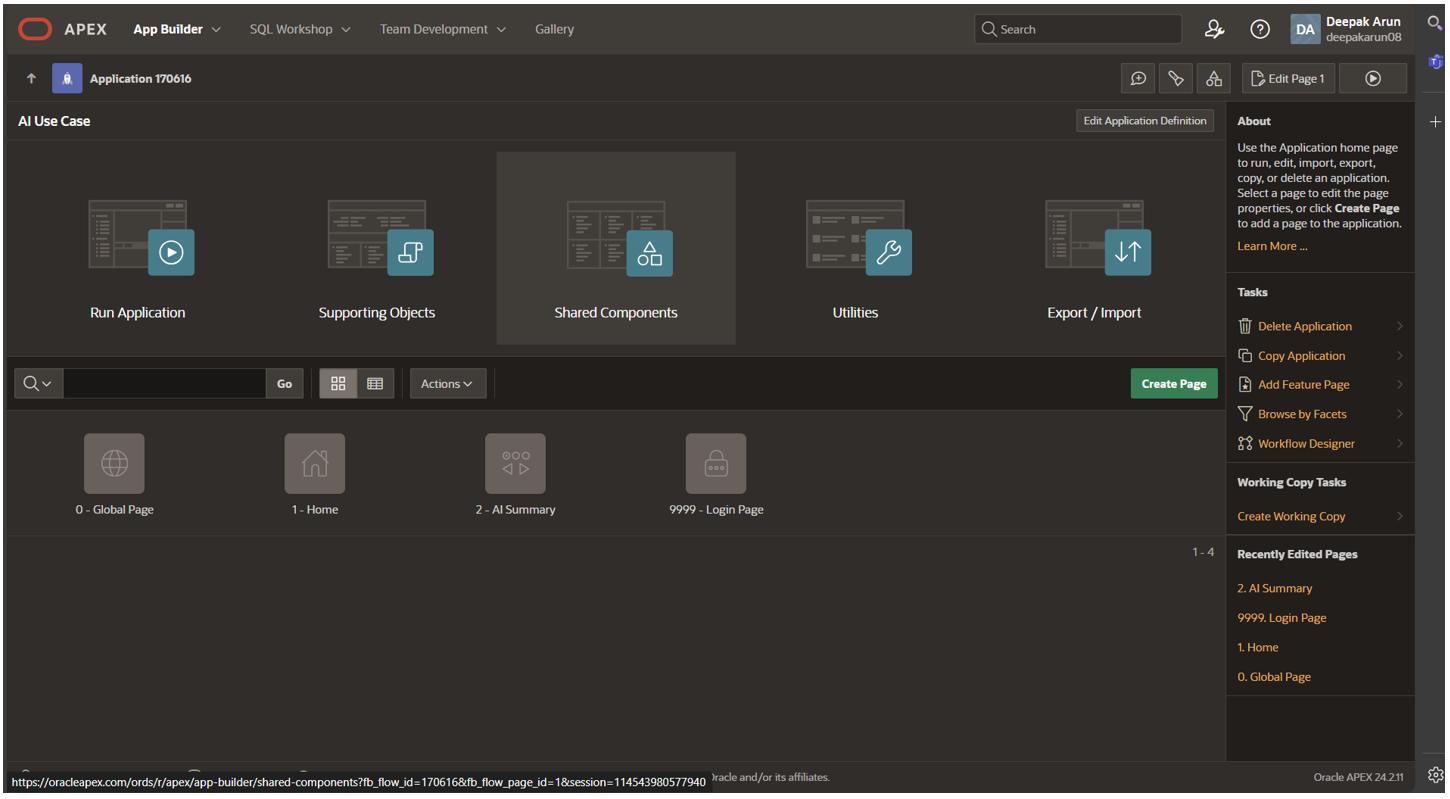
2. Go to Files and Reports and Click on Static application files.
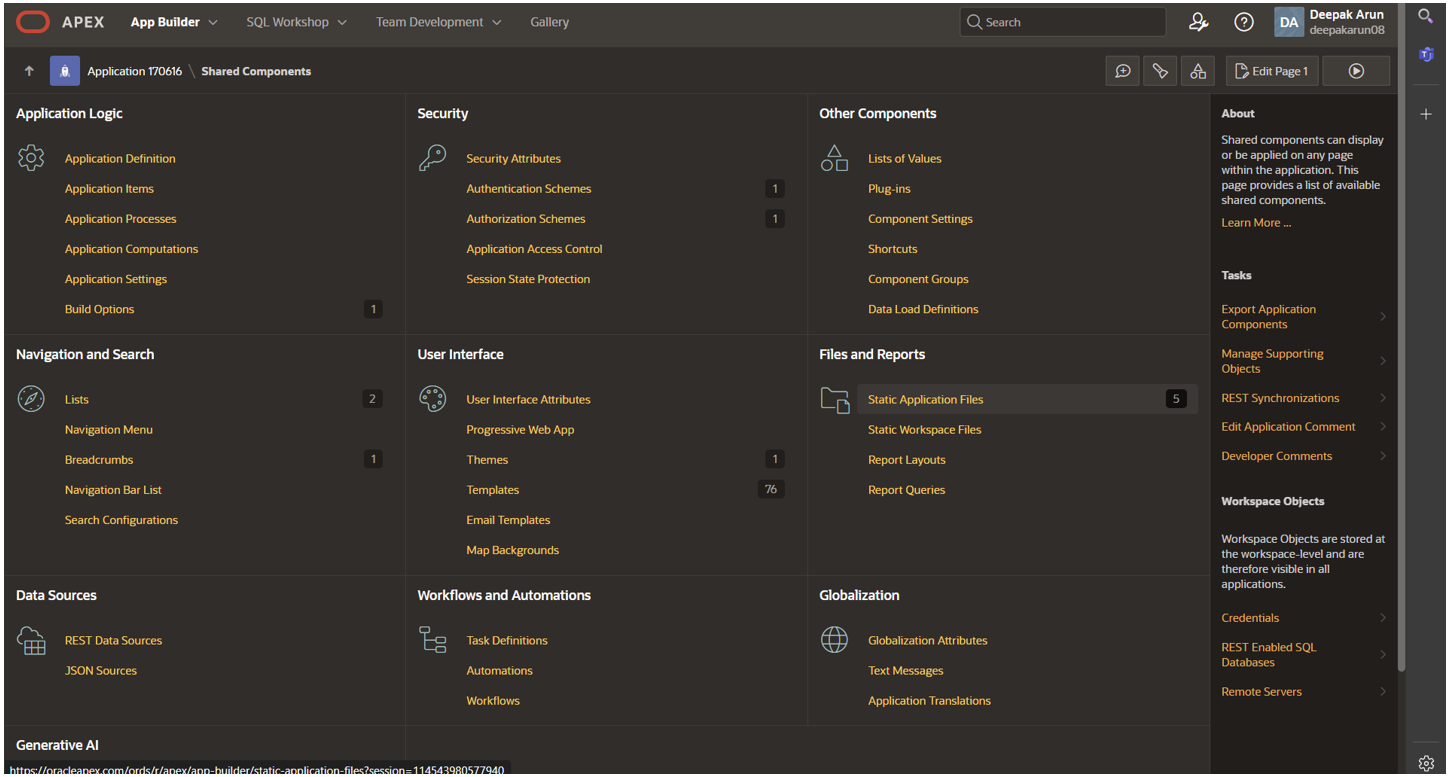
3. Click on Create File Button.
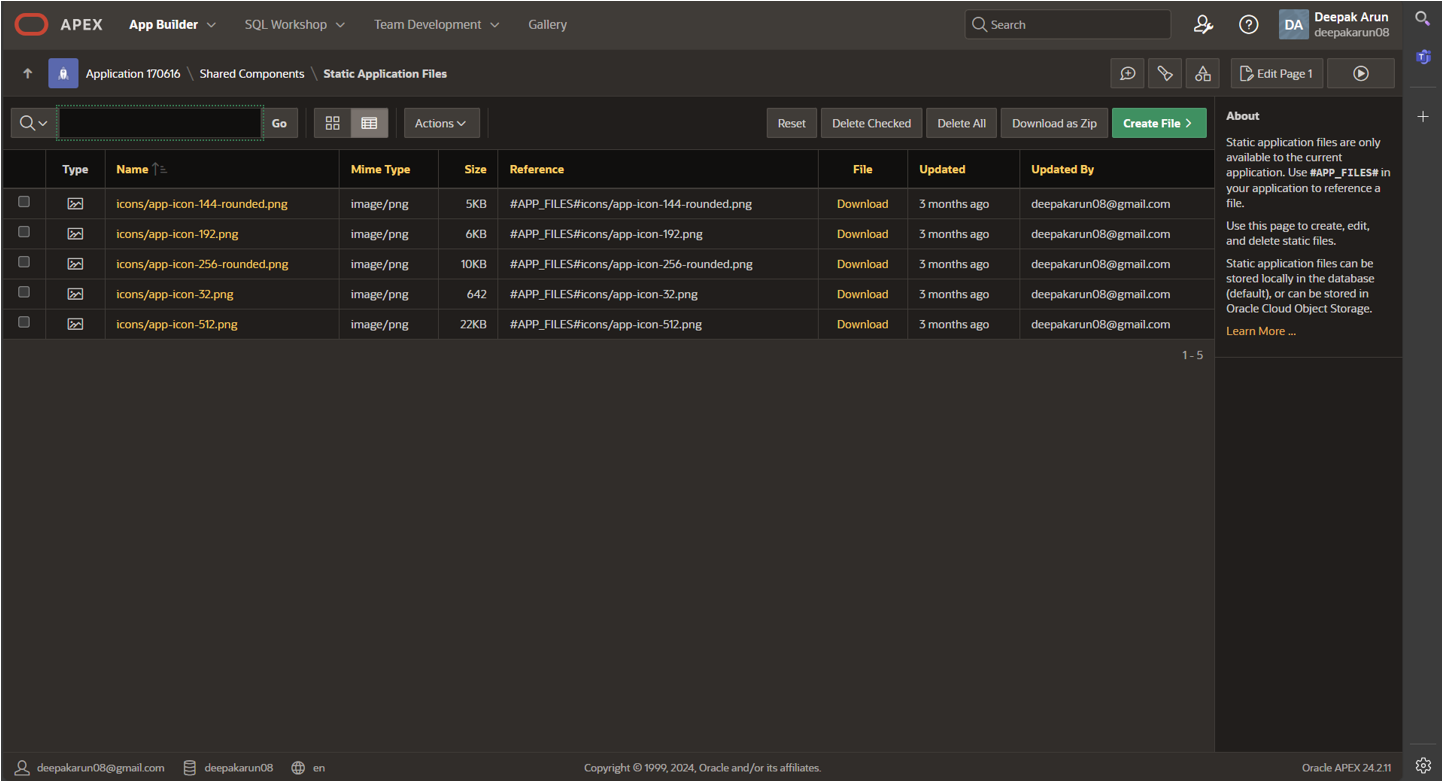
4. Give your CSS file a name and click create button.
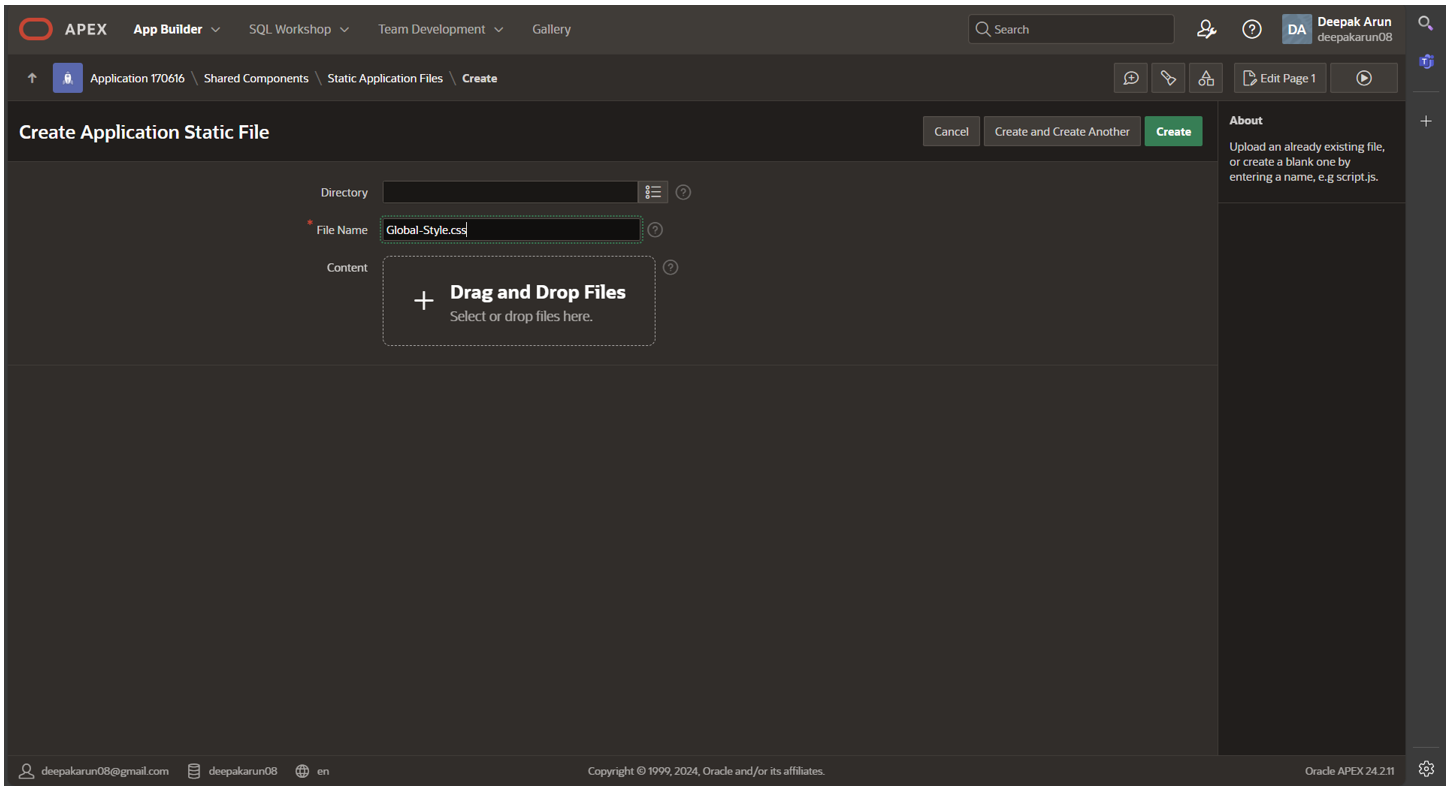
5. Write your Global Variables or Tokens here and click Save Changes Button.
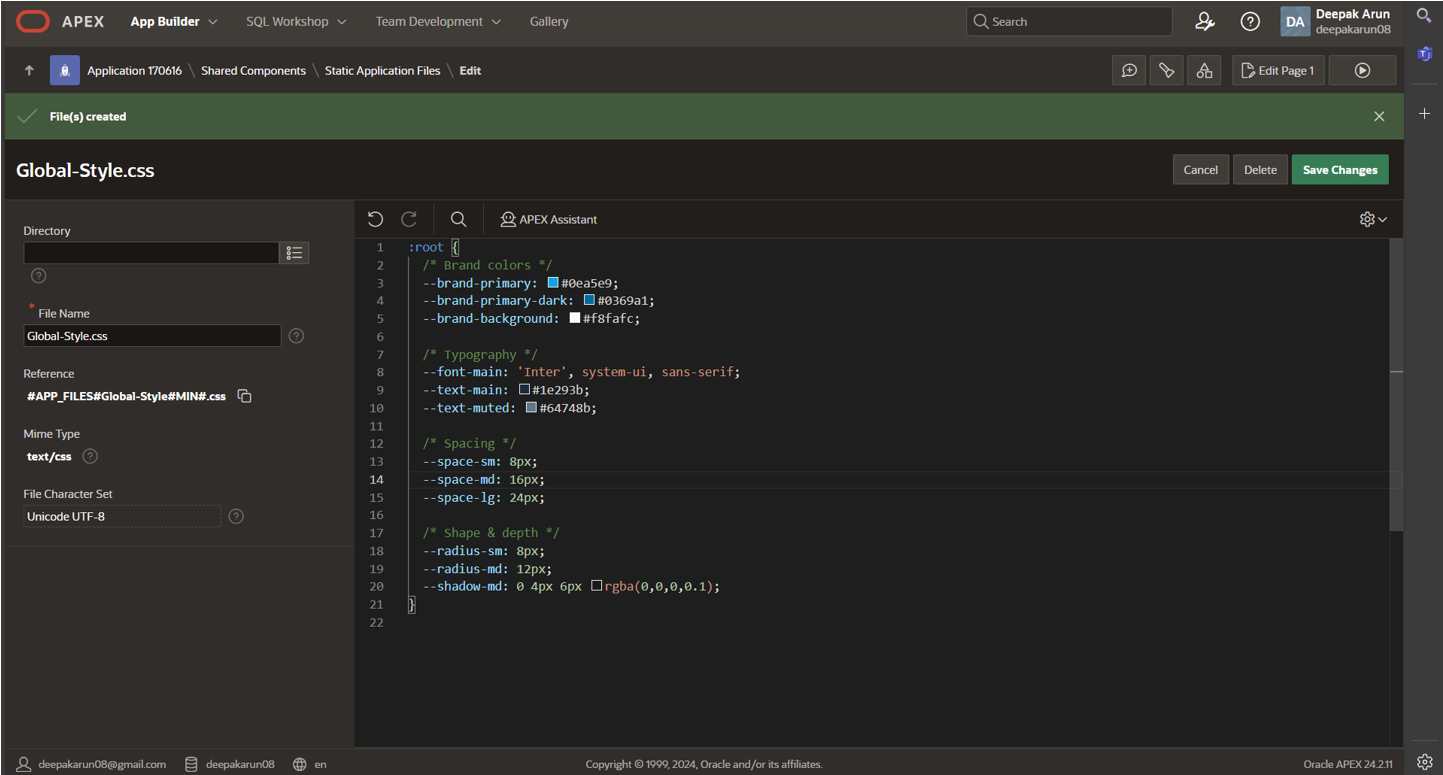
6. Copy your CSS file path from the previous step.
7. Go back to the shared component.
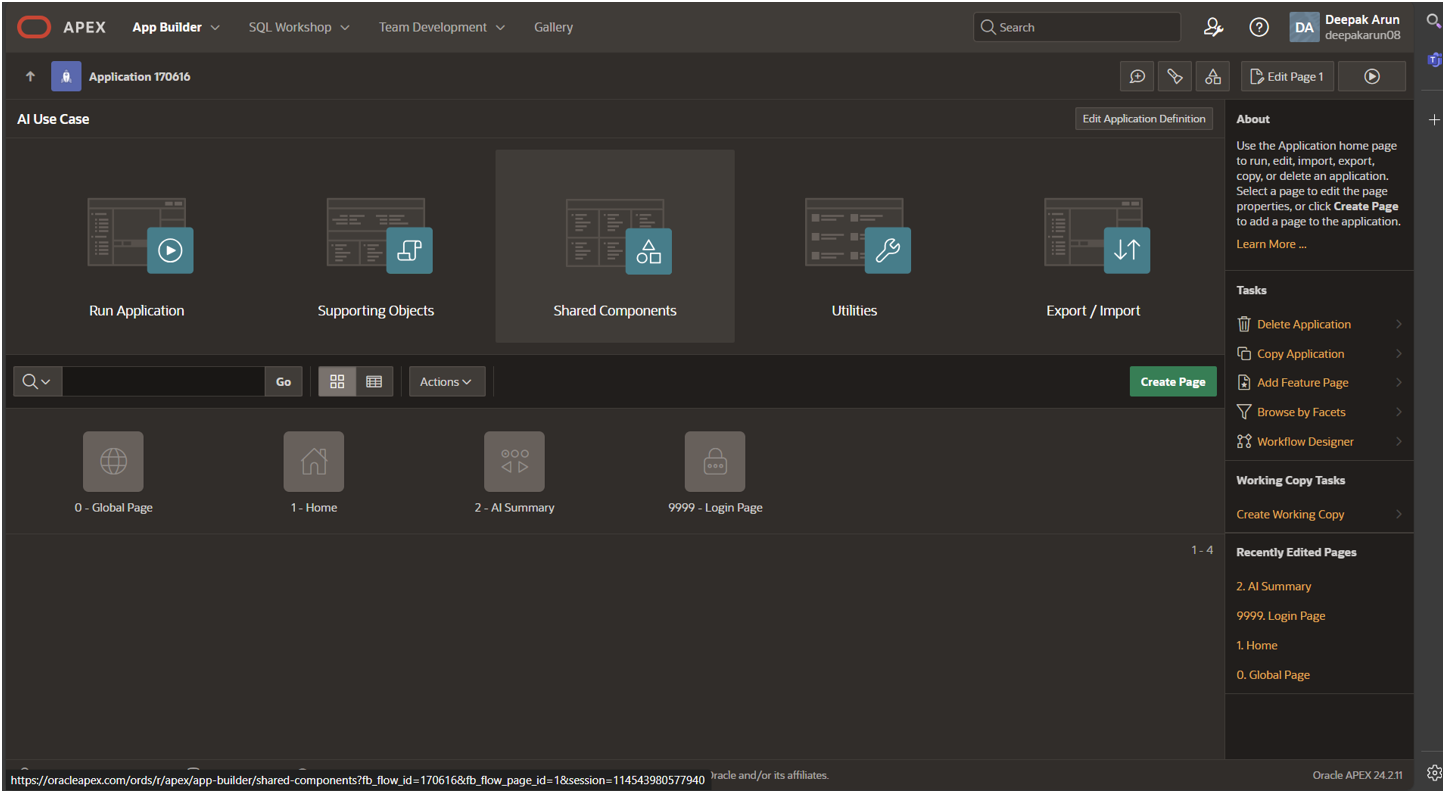
8. Go to application Logic – Application Definition – Click User Interface Tab.
9. Go to CSS section – Paste your Global CSS file path here and click Apply Changes Button.
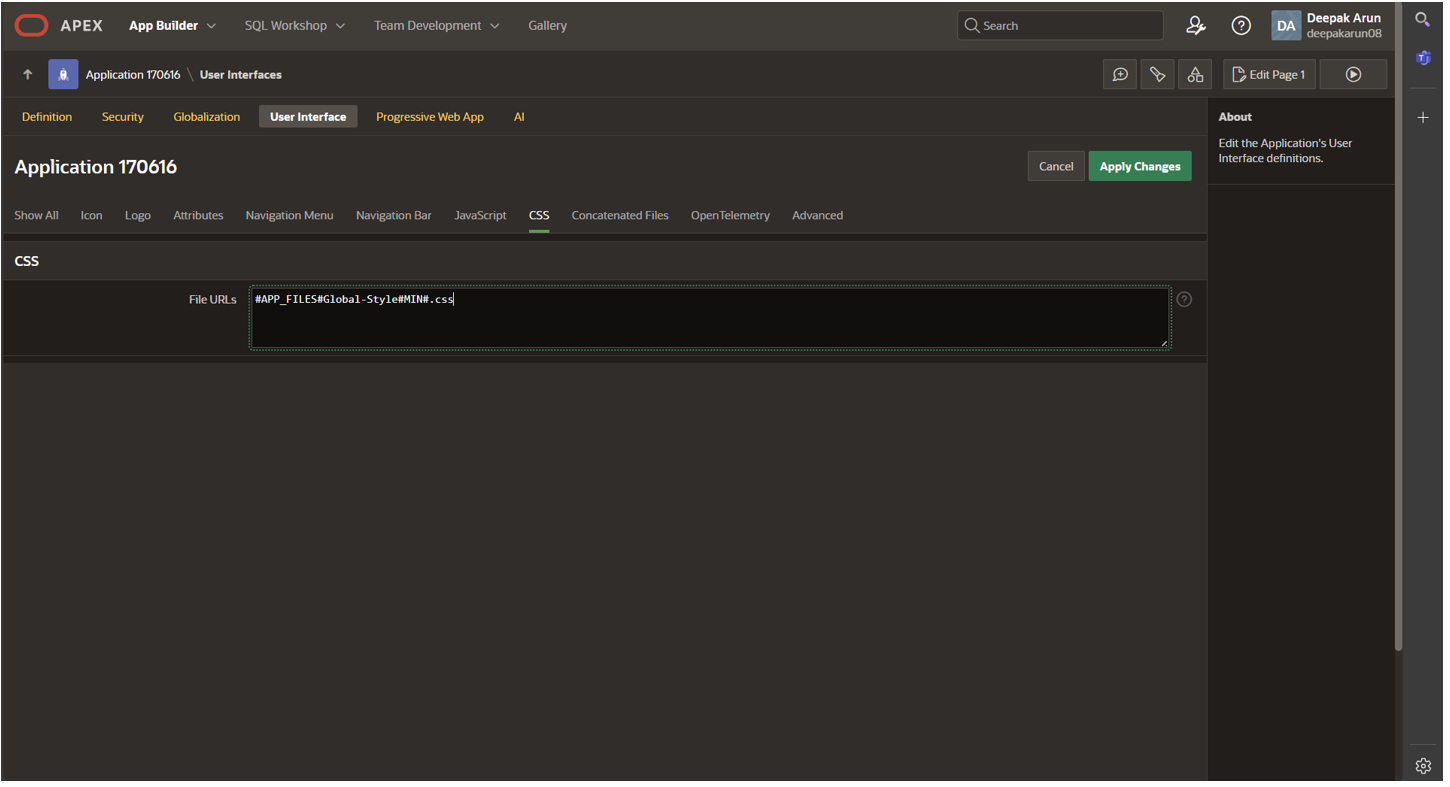
Now the Global CSS Variables or Tokens can easily be used in all the application pages.
Step 2: Gently Override Universal Theme
You don’t need to rewrite APEX. You just guide it.
Page background and regions
Add these classes in your Global CSS below your Root Variables.
.t-PageBody {
background-color: var(–brand-background);
font-family: var(–font-main);
color: var(–text-main);
}
.t-Region {
background: #ffffff;
border-radius: var(–radius-md);
box-shadow: var(–shadow-md);
border: none;
}
Immediately, the app feels lighter and more modern.
Typography: The Fastest Visual Upgrade
Changing the font is the quickest way to change the “feel” of an APEX app.
body,
.t-Form-label,
.t-Button {
font-family: var(–font-main);
}
This alone makes the UI feel intentional instead of default.
Form Customization: Where UX Improves the Most
Forms are where users spend most of their time—and where APEX feels the most crowded.
Input height and padding
body,
.t-Form-label,
.t-Button {
font-family: var(–font-main);
}
This improves readability and touch usability instantly.
Better spacing between fields
.t-Form-fieldContainer {
margin-bottom: var(–space-lg);
}
.t-Form-label {
color: var(–text-muted);
font-weight: 500;
}
Now the form feels calmer and easier to scan.
Clear focus state
.apex-item-text:focus,
.apex-item-select:focus {
border-color: var(–brand-primary);
box-shadow: 0 0 0 3px rgba(14,165,233,0.25);
}
This small detail adds a lot of perceived quality.
Buttons That Feel Modern
.t-Button {
background: var(–brand-primary);
border-radius: var(–radius-md);
border: none;
padding: 10px 20px;
font-weight: 500;
}
.t-Button:hover {
background: var(–brand-primary-dark);
}
.t-Button–hot {
background-color: var(–brand-primary) !important;
border-color: var(–brand-primary-dark) !important;
}
Clean. Simple. Confident.
Conclusion
Universal Theme provides an unmatched starting point for Oracle APEX development, but true excellence lies in customization that reflects your brand. By implementing CSS tokens and targeted overrides, you create a cohesive design system that enhances usability, builds user trust, and eliminates the “generic enterprise tool” feel.
The result? Internal applications that users actually enjoy, ones that signal intentionality and investment. Start with these foundational changes, iterate based on feedback, and watch your APEX ecosystem evolve from reliable to remarkable. Your teams deserve applications that don’t just work but inspire.