Encrypting a Microsoft SQL Server database is straightforward with Transparent Data Encryption (TDE). The more complex challenge is protecting and managing the encryption keys themselves. Storing encryption keys on the same server as the database can create a single point of compromise, making externalized key management an important consideration for organizations with strict security and compliance requirements.
This is where Oracle Cloud Infrastructure (OCI) Vault can help. By integrating SQL Server with OCI Vault through a custom Extensible Key Management (EKM) Provider, organizations can move encryption key management outside the database server while continuing to use SQL Server’s native TDE capabilities.
In this blog, we explore how a custom DLL bridges Microsoft SQL Server’s SQLCrypt interface with OCI Vault, how Instance Principal authentication eliminates the need for long-lived credentials, and how we addressed one of the most important challenges in production-grade key management: key rotation.
The Challenge: Microsoft SQL Server and OCI Vault Use Different Interfaces
MS SQL Server can only talk to cryptographic providers that implement Microsoft’s SQLCrypt interface — a native Windows DLL. OCI Vault, on the other hand, only exposes its Key Management Service through authenticated REST APIs. Neither side can be modified to understand the other, so out of the box, there is simply no way to make MS SQL Server use OCI Vault as its key store.
The Solution: A Custom DLL That Bridges the Two
We built a custom DLL that registers with Microsoft SQL Server as a standard EKM Provider while acting as an authenticated OCI client behind the scenes.
To Microsoft SQL Server, it looks like any other cryptographic provider. It exposes the required SqlCryptOpenSession, SqlCryptEncrypt, SqlCryptDecrypt, and related functions. To OCI, it looks like a normal application that authenticates using Instance Principal and calls the Vault’s encrypt/decrypt REST endpoints.
Nothing about Microsoft SQL Server or OCI Vault had to change—only the DLL in between.
The custom DLL bridges Microsoft SQL Server’s SQLCrypt interface and OCI Vault’s REST API, translating requests on one side into authenticated cloud calls on the other.
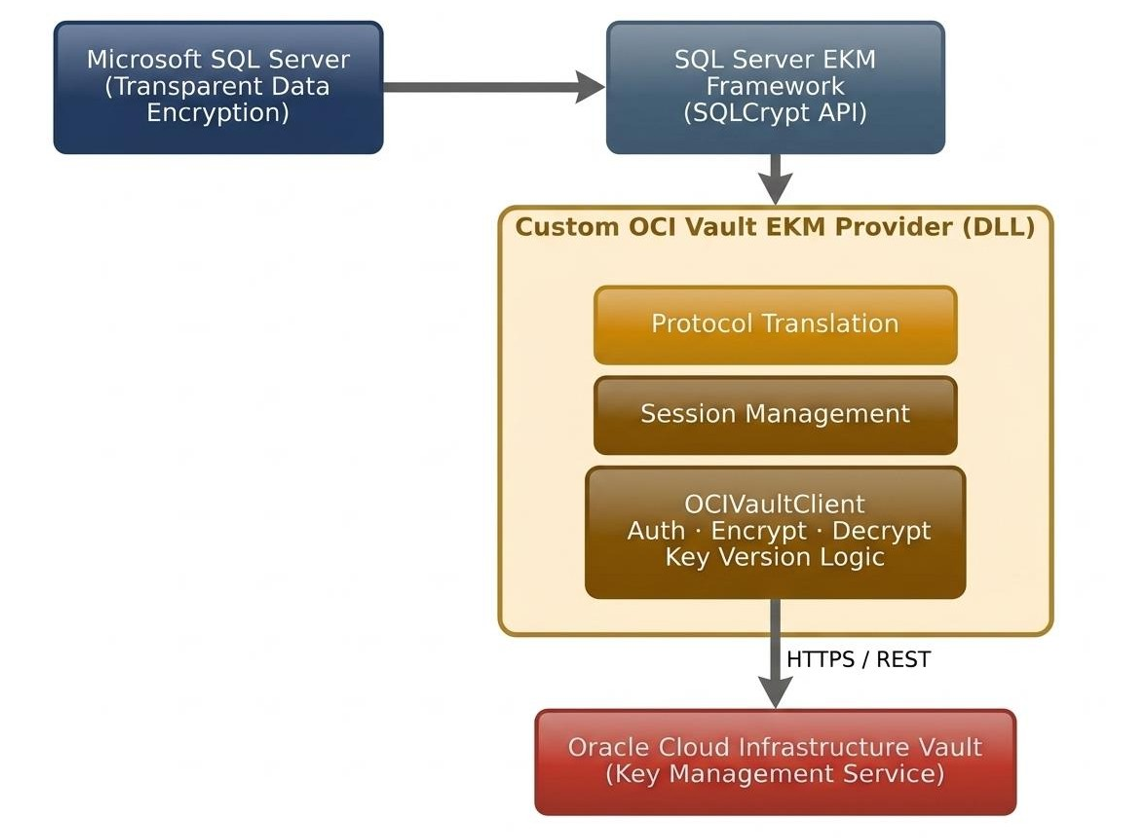
The Custom DLL bridges MS SQL Server’s SQLCrypt interface and OCI Vault’s REST API — translating requests on one side and authenticated cloud calls on the other.
Why This Matters: Keys Never Touch the Database Server
- Private keys are generated, stored, and rotated entirely inside OCI Vault—never on the Microsoft SQL Server host.
- Authentication uses Instance Principal, so there are no long-lived OCI credentials stored on disk.
- Microsoft SQL Server’s Transparent Data Encryption workflow remains completely unchanged, with no application or schema changes required.
The Real Engineering Challenge: Key Rotation
Encryption and decryption on their own were the easy 80%. The hard part surfaced the first time we rotated the OCI key: databases that were encrypted before the rotation suddenly failed to recover after an MS SQL Server restart, because the provider only kept the ciphertext and had thrown away which OCI key version had produced it. Once a key is rotated, that guess is no longer safe.
The fix was to stop treating the ciphertext as the whole answer. Every encrypted payload now carries its OCI keyVersionId with it — and if that metadata is ever missing, the provider automatically searches every historical key version until decryption succeeds.
That single change — persisting the key version alongside the ciphertext, with a compatibility fallback for anything encrypted before the fix — is what turns this from a working demo into something that survives real production key rotation without any manual database re-encryption.
What we validated
- Provider registration and MS SQL Server credential initialization
- Encryption and decryption via OCI Vault, using Instance Principal authentication
- Full Transparent Data Encryption enablement on a live database
- Automatic database recovery after an MS SQL Server service restart
- Automatic database recovery after an OCI Vault key rotation — with zero administrator intervention.
Conclusion
MS SQL Server’s native encryption is only as strong as the key management behind it. By building a custom EKM Provider around Oracle Cloud Infrastructure Vault, encryption keys can be fully externalized to a centrally governed, auditable, cloud-native KMS — without giving up MS SQL Server’s built-in Transparent Data Encryption, and without leaving key rotation as an unsolved edge case.
Looking to strengthen your SQL Server security with OCI-based key management?
Contact Conneqtion to learn how our Oracle Cloud Infrastructure and integration expertise can help you design and implement a secure, scalable key-management solution tailored to your organization’s requirements.
Frequently Asked Questions
- Does this require any changes to existing Microsoft SQL Server applications?
No. TDE remains fully transparent to applications. The provider only changes where the protecting key is physically stored and managed.
- What happens if OCI Vault is briefly unreachable?
The affected cryptographic operation fails safely and is logged with full diagnostic details. Microsoft SQL Server surfaces a standard HRESULT rather than an undefined error.
- Can this pattern extend to other cloud key management services?
Yes. The Microsoft SQL Server-facing layer is intentionally decoupled from the OCI-specific communication code, so the same architecture could be adapted to another KMS with moderate rework.