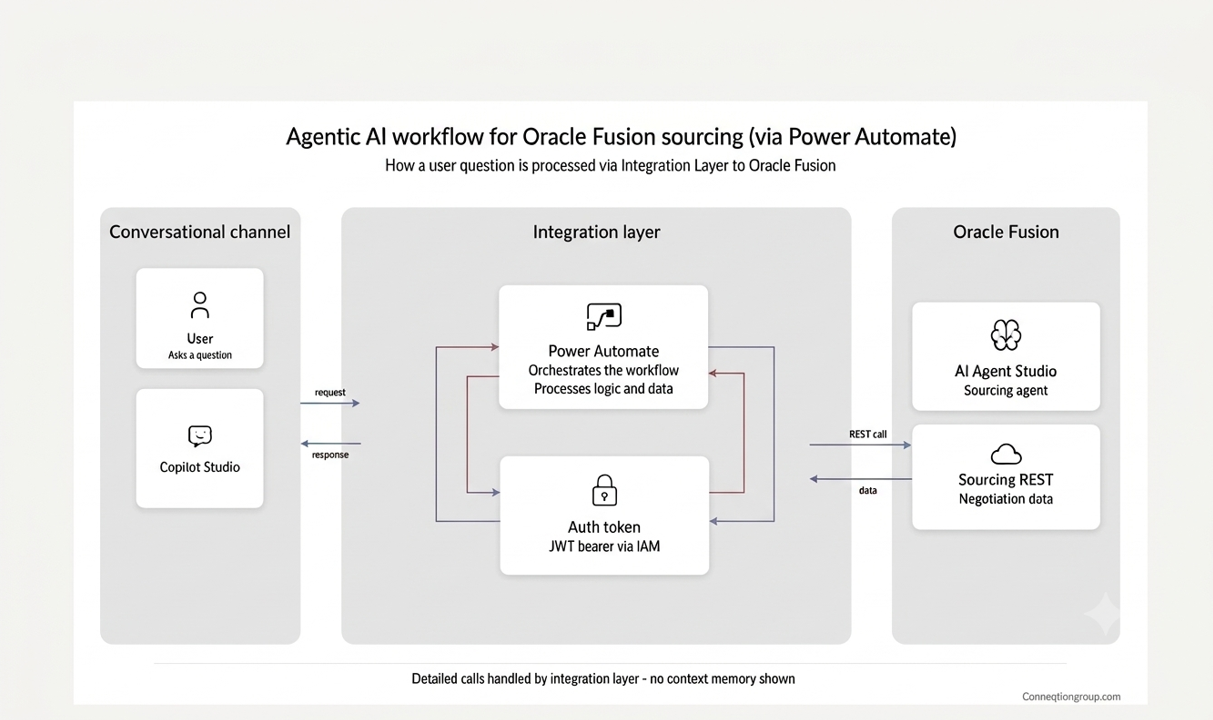
Enterprise buyers and sales teams rarely live inside Oracle Fusion. They live in Microsoft Teams and Microsoft Copilot, switching between chat threads, emails, and meetings all day long. Every time a Fusion answer is needed, someone must break that flow and log into Fusion, navigate to the right screen, and hunt for the data point. This workflow, built on Oracle AI Agent Studio, closes that gap.
The timing matters. As of Microsoft’s Q3 FY26 earnings disclosure April 2026, Microsoft 365 Copilot had reached 20 million paid enterprise seats which is up from 15 million just one quarter earlier, the fastest three-month seat growth Microsoft has reported since Copilot launched. That scale of adoption means Copilot is no longer a side channel, for a large share of the enterprise workforce, it is the front door. If Oracle Fusion data can’t answer questions there, it’s effectively invisible to the people who need it most.
This blog explores how this intelligent interaction is built using Oracle AI Agent Studio, demonstrating how enterprises can create low-code, enterprise-grade AI agents that streamline Oracle Fusion Sourcing processes. It also highlights how Oracle Fusion APIs and AI-driven automation work together to deliver faster, more intuitive user experiences while reducing manual effort and improving productivity.
Why This Matters: Bringing Fusion Data Where Teams Already Work
Enterprise software adoption often stalls at the login screen. Occasional Fusion users like buyers, approvers, sales leaders don’t want another application, another password, or another set of navigation paths to learn. They want answers where they already collaborate.
This is the core problem agentic workflows solve. An agent built once in Oracle AI Agent Studio can be published and exposed through a single API, then consumed as a channel inside:
- Microsoft Copilot and Microsoft Teams — where the workforce already spends its day
- Ask Oracle, the native in-application assistant inside Oracle Fusion
- Any third-party or custom application that calls the published API
One agent, many surfaces, no duplicated build effort. That reusability is what separates a governed agentic architecture from a one-off chatbot.
How the Agentic Workflow Works
At a high level, the request flow behind this proof of concept follows a consistent, repeatable pattern:
- A user asks a question inside Copilot or Teams.
- The question is routed to the agent workflow through its published API.
- The workflow calls Oracle Fusion Sourcing REST services to retrieve negotiation headers, lines, suppliers, and supplier responses.
- The response is formatted and returned into the chat thread.
- Follow-up questions are answered from the same retrieved context, without repeating the original request.
This pattern is what allows a single Oracle AI Agent Studio workflow to answer identically whether the request originates in Copilot, Teams, Ask Oracle, or an external system.
Part 1 – The Experience in Microsoft Copilot and Teams
The scenario used to validate this architecture is a sourcing negotiation enquiry. A Fusion buyer performs this task routinely, but it usually requires several screens and manual cross-referencing. Screens 1–6 below show the end-user conversation exactly as it appears to a buyer in the Copilot channel, using live Oracle Fusion Sourcing data.
1. Asking for the Items on a Negotiation
Instead of relying on forms or predefined commands, the AI agent understands user intent from natural language queries such as, “What items are included in this negotiation?” If a critical detail is missing for example, the sourcing negotiation number, the agent responds with a single, context-aware clarifying question rather than failing or returning an error. Once the user provides the negotiation number, the agent instantly retrieves the relevant Oracle Fusion Sourcing record without requiring users to log in to Fusion or manually navigate through multiple screens.
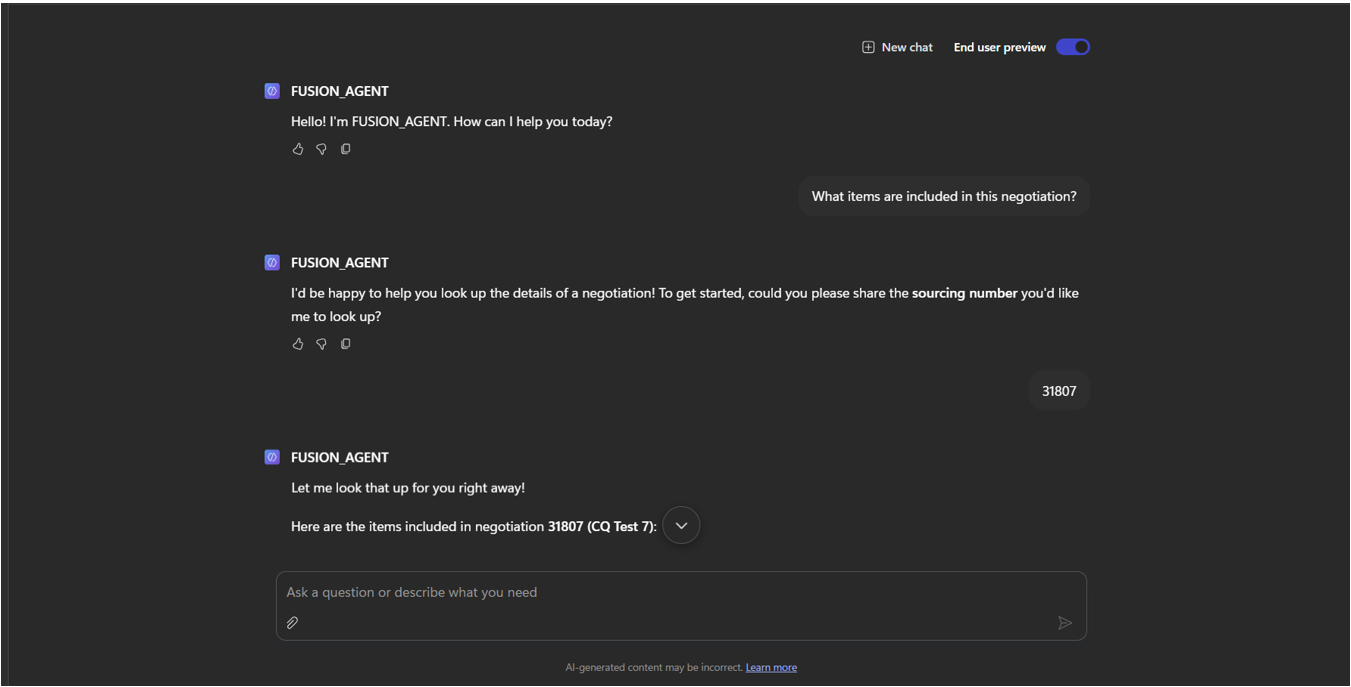 Microsoft Copilot, end-user preview — intent recognition and clarifying question.
2. Structured Item List Returned in Chat
Retrieved data doesn’t come back as a wall of text. The nine negotiation lines come back as a clean table directly inside the chat. The workflow also adds a layer most static reports can’t: it flags anomalies, such as item CAP10031 appearing twice, and proactively invites the next question. That distinction between simple data retrieval and an assistant that surfaces what looks unusual is central to the value of agentic AI in enterprise workflows.
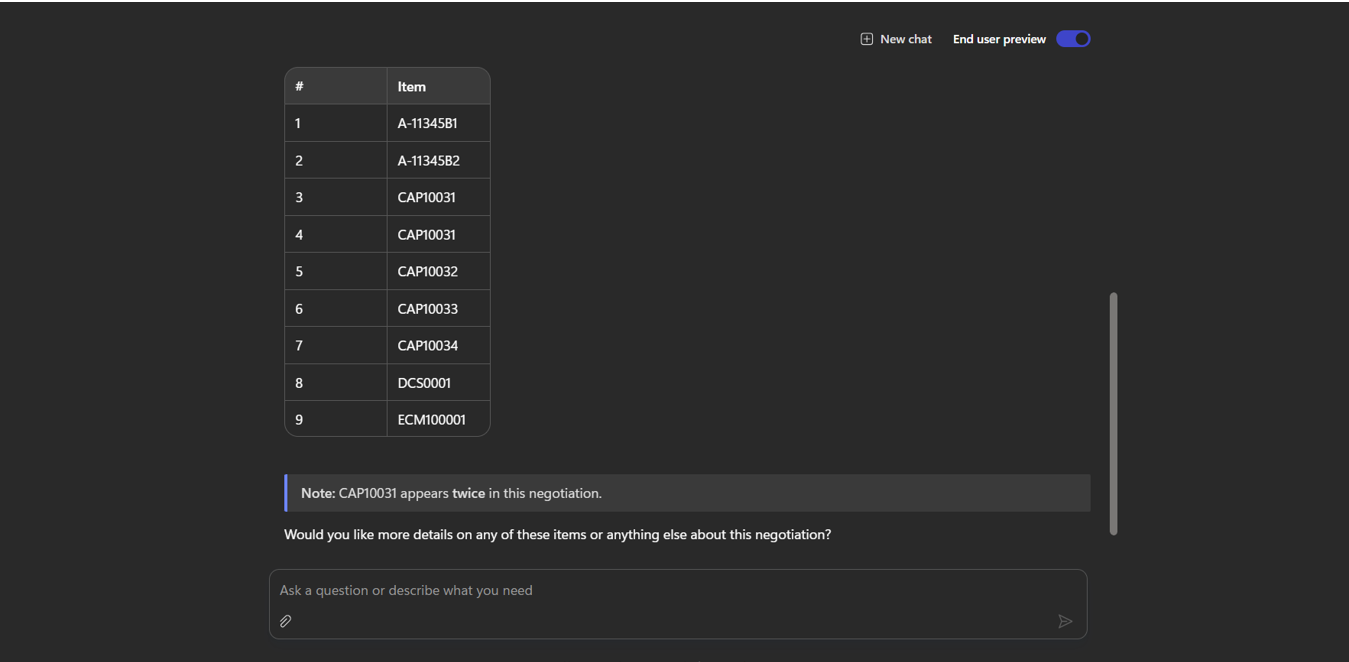 Negotiation 31807 lines, with an automatic duplicate-line observation.
3–5. Conversational Follow-Ups on the Same Context
The buyer can continue the conversation naturally: “When does this close?”, “Who created this negotiation?”, “What’s the award-by date?” without ever restating the negotiation number. The agent holds context across the thread and answers each follow-up from data it has already retrieved, returning precise timestamps and the responsible buyer. Three questions that would each normally mean a separate Fusion screen are answered in seconds, inside the same chat.
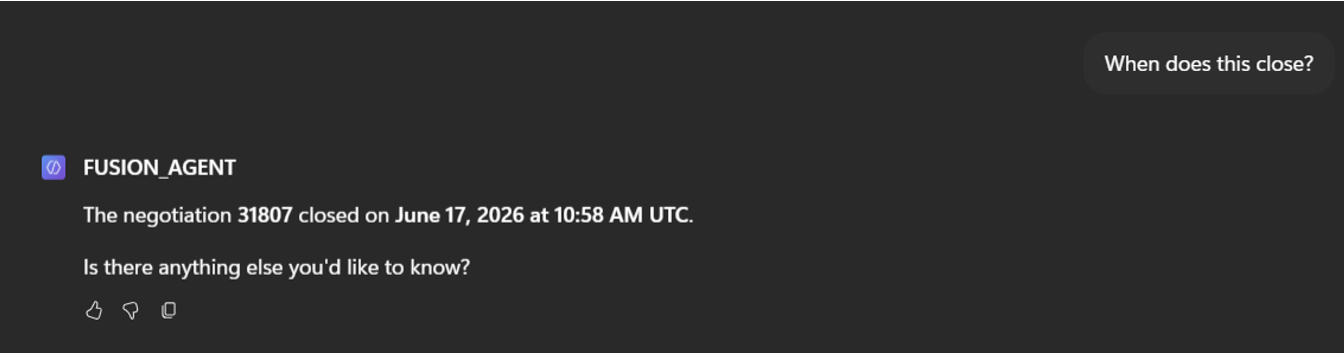
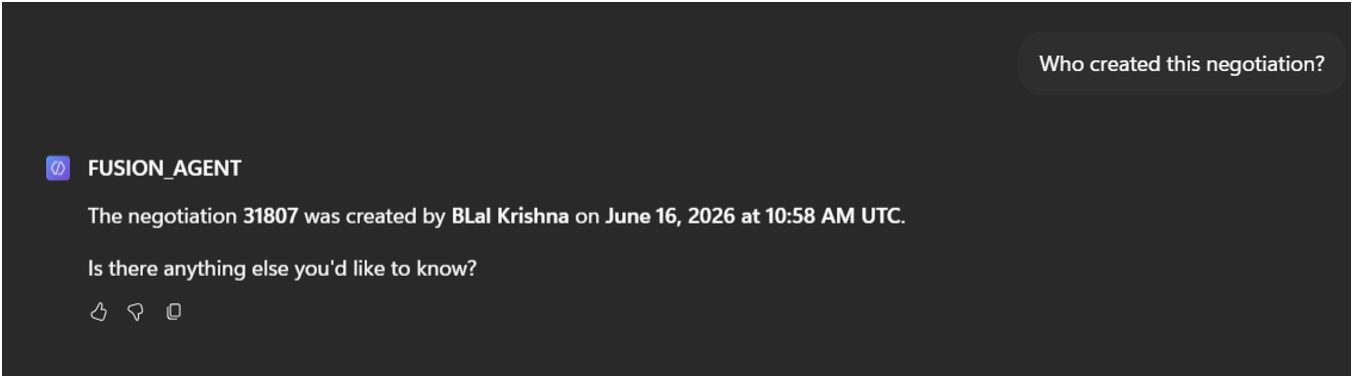
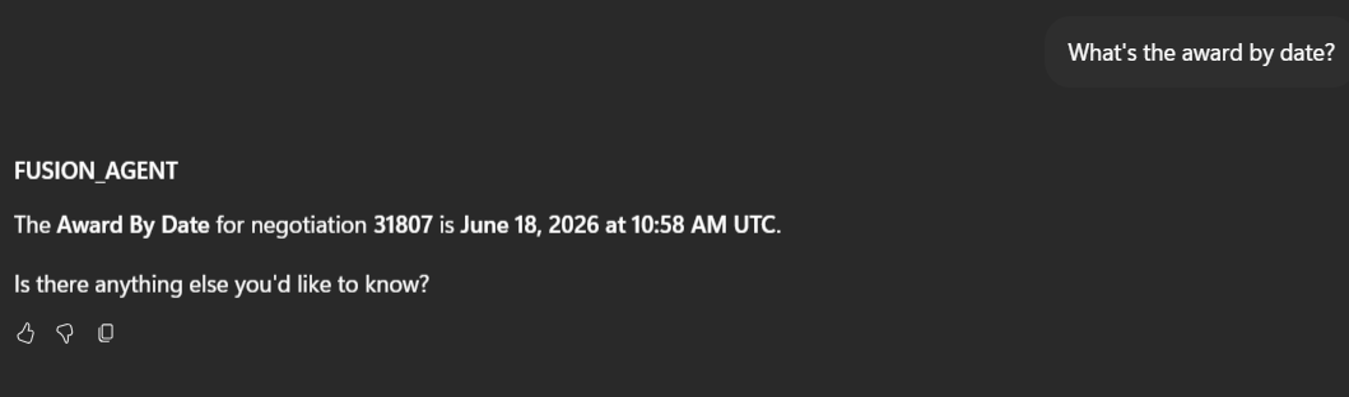 Close date, creator, and award-by date — context retained across turns.
6. Supplier Invitations and Response Status
When asked, “Who are the suppliers?“, the AI agent instantly returns the complete list of invited suppliers, including their supplier site details and current response status. Clear visual indicators distinguish suppliers who have already submitted quotations from those yet to respond, enabling buyers to assess progress at a glance. For procurement teams working against tight deadlines, this provides immediate, actionable insight.
For example, recognizing that only two of six suppliers have responded, leaving four suppliers to follow up before the award deadline. Since the information is already available in the existing context, the agent delivers the answer instantly without triggering another Oracle Fusion API call, improving both response time and efficiency.
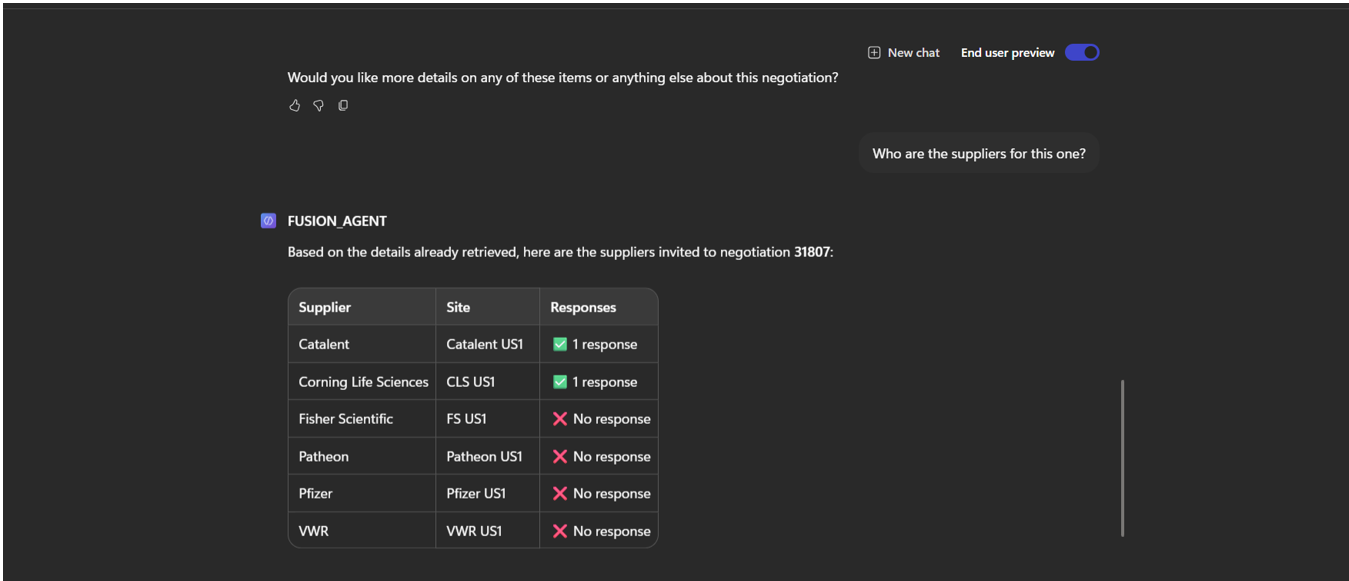 Six invited suppliers; Catalent and Corning Life Sciences have responded.
Part 2 – What Sits Behind It in Oracle AI Agent Studio
Everything a buyer sees in Part 1 is produced by an agentic app workflow. Screens 7–11 show that workflow, its governed lifecycle, and the same answers delivered natively inside Fusion.
7. Workflow Registry with Governed Lifecycle
The Workflows page in AI Agent Studio lists every agent available to the organization, each with a code, an owner, a last-edited date, and a Published or Draft status. SOURCING_WK_TEST_LK_COPILOT is the workflow answering in Copilot. This is the governance story that matters most to leadership: agents are versioned, attributable assets that move through draft, test, and publish stages, not shadow IT built outside its visibility.
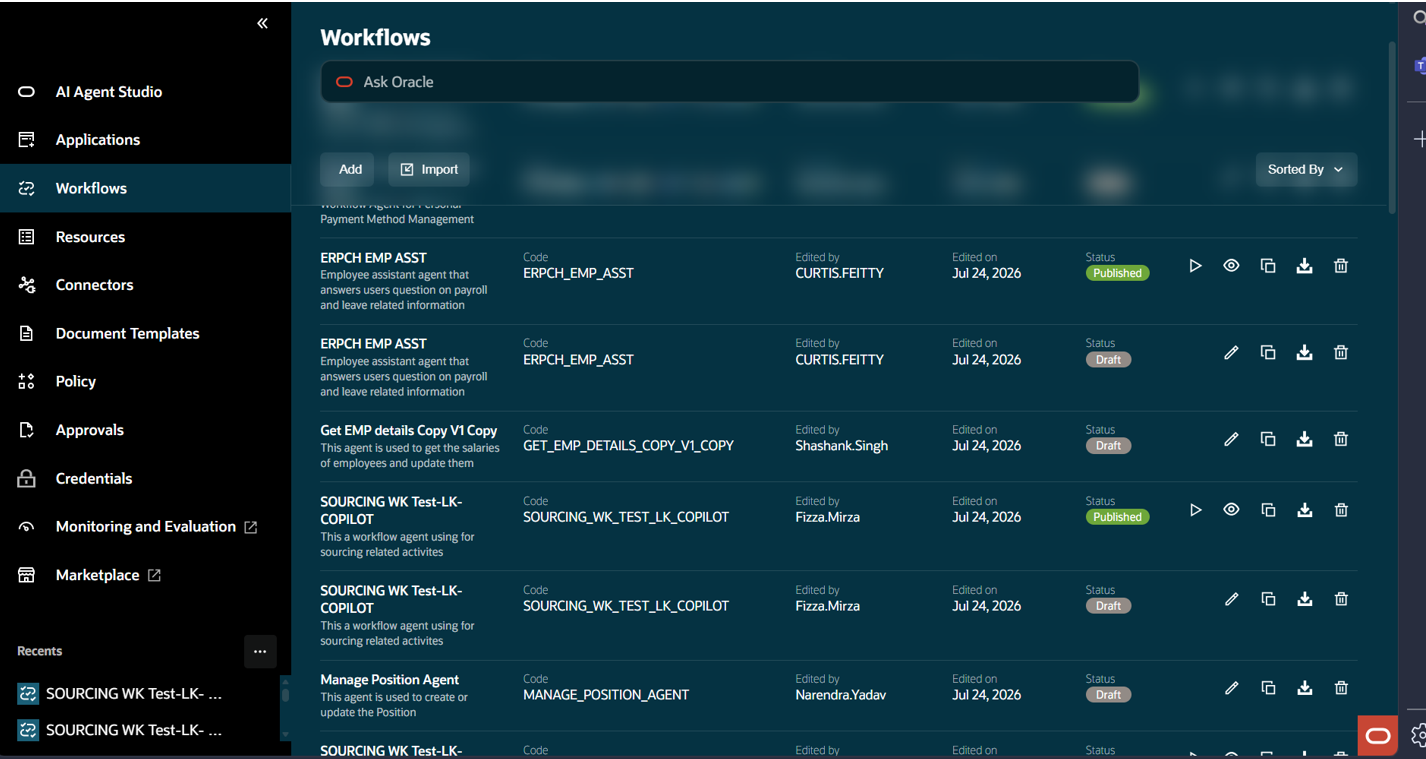 Draft and published versions of the sourcing workflow, alongside other agents.
8. The Workflow Itself, Built Without Code
The sourcing workflow is assembled visually, using a trigger followed by steps such as “Negotiation Details / Set Variables” that call Fusion REST services and hold retrieved values for the rest of the conversation. Debug and Publish are one click away, meaning a functional consultant can extend the agent with capabilities like award analysis or supplier scoring, without a full development cycle.
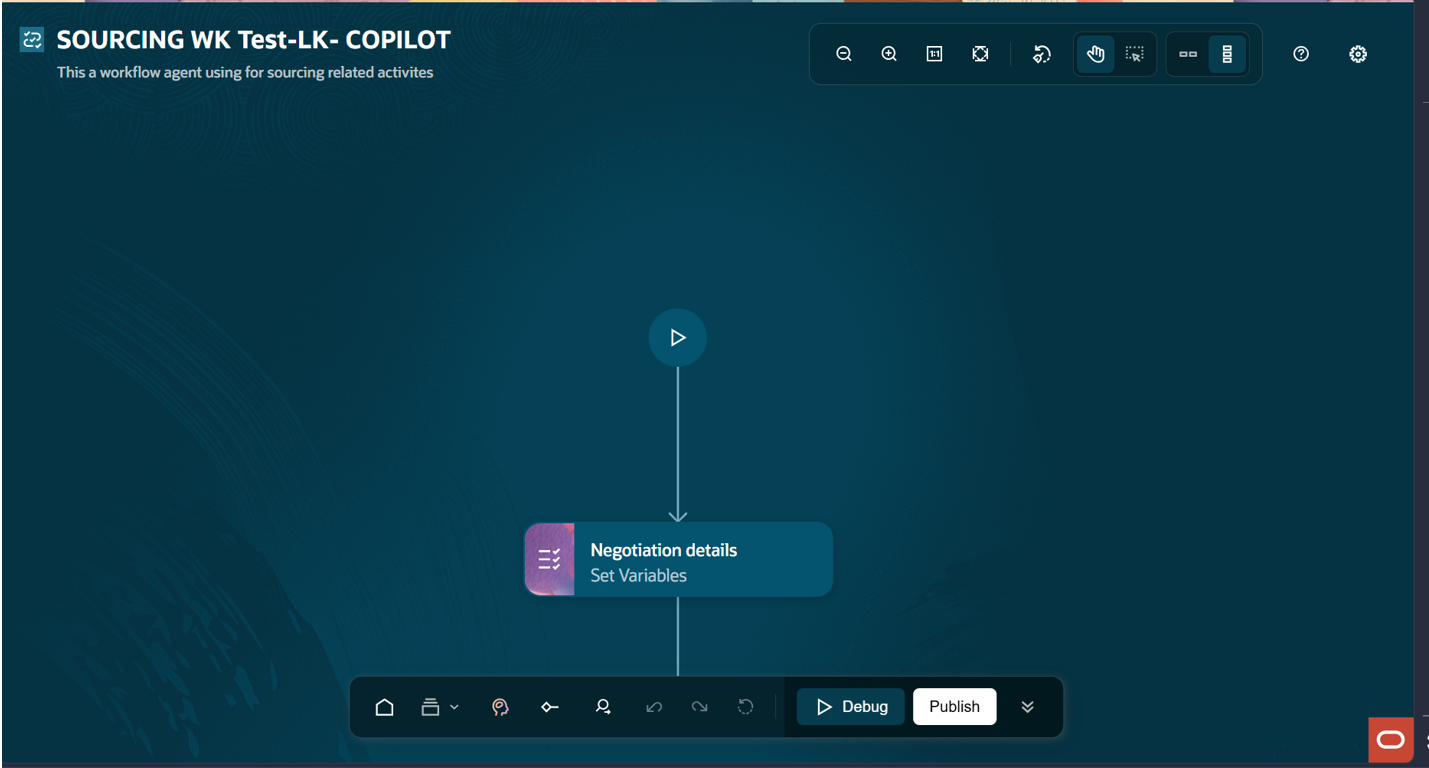 SOURCING WK Test-LK-COPILOT in the workflow designer.
9. The Same Agent Inside Fusion via Ask Oracle
For users already working inside Oracle Fusion, the identical workflow answers through Ask Oracle, complete with a conversation history rail so earlier negotiation enquiries can be reopened. The user types the negotiation number and receives a full summary including same agent, same data, native experience. The choice of surface belongs to the user, not the build.
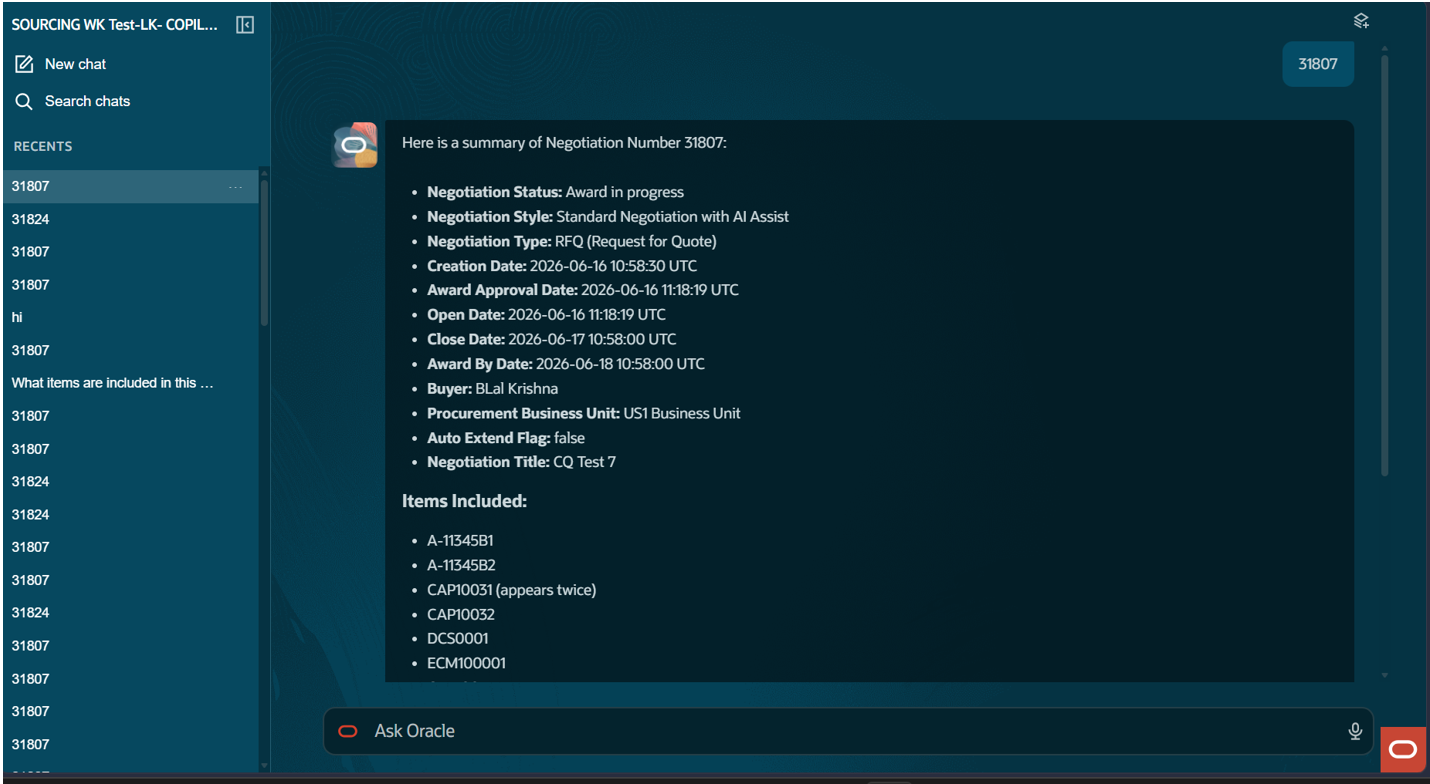 Ask Oracle, with recent negotiation conversations retained.
10. Full Negotiation Summary in One Response
A single question returns the full negotiation picture like status, style, type, title, creator, buyer, procurement business unit, and the complete date chain from creation through close to award-by, something that requires visiting several Fusion pages to assemble manually.
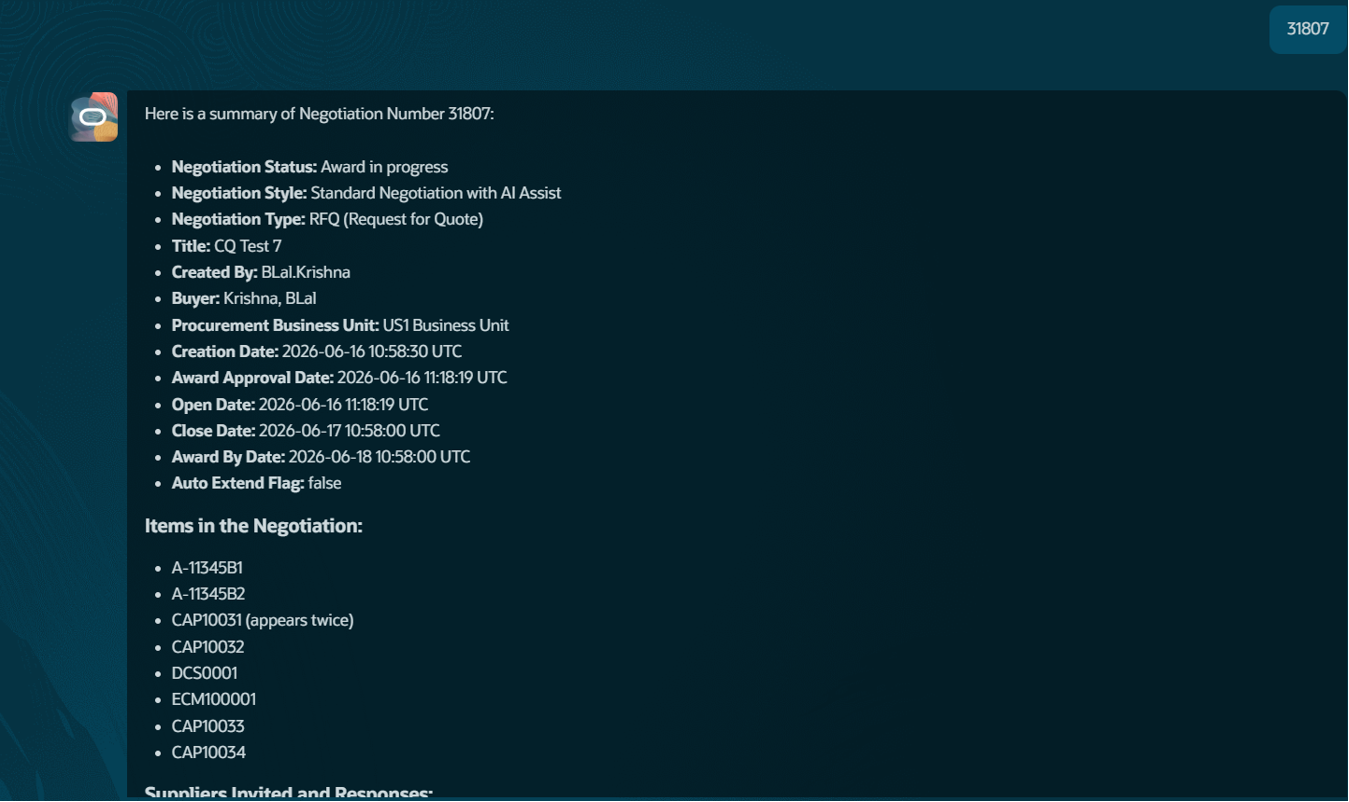 Header attributes and item list for negotiation 31807.
11. Items and Supplier Responses Together
The response closes with items and the supplier response matrix in one view, again noting the duplicated line, and offers to go deeper. The workflow returns the same structured payload regardless of channel, which is why the Copilot rendering in Part 1 and this Fusion rendering agree exactly like a single source of truth, presented in the idiom of each surface.
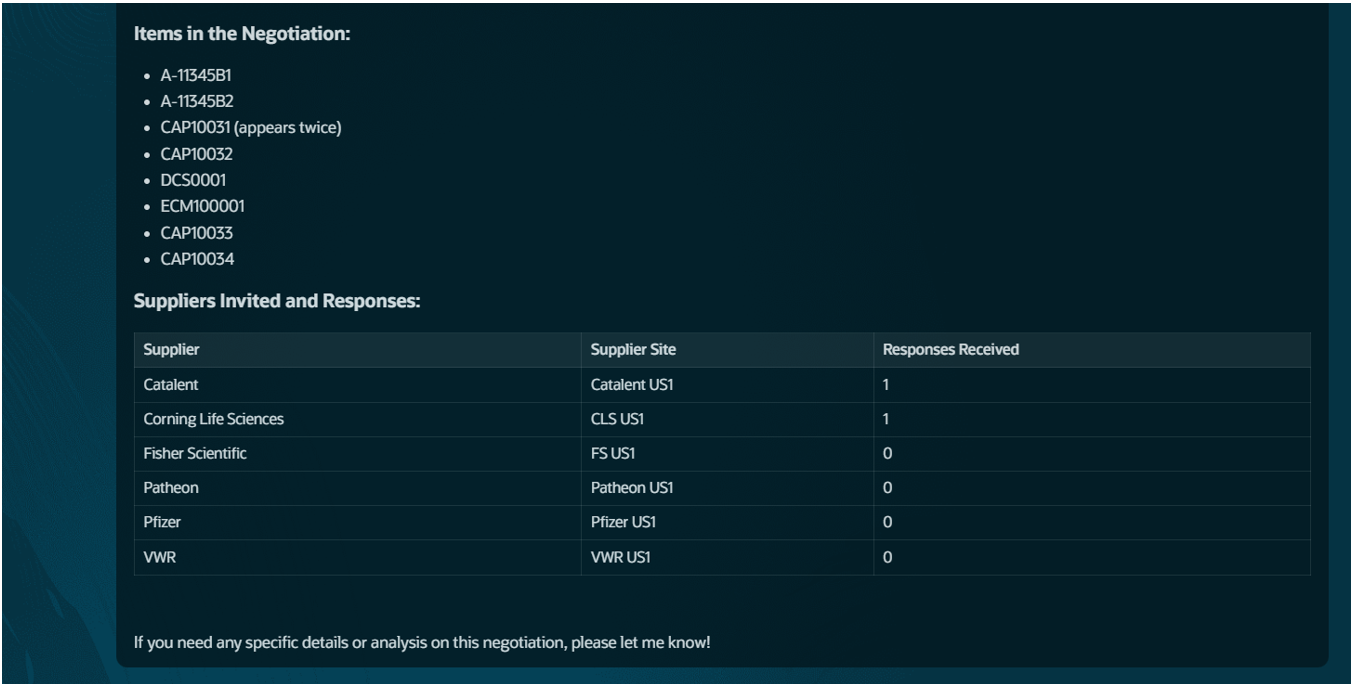 Items and supplier responses returned in the same answer.
Conclusion
Enterprise AI delivers the greatest value when it brings business intelligence directly into the applications employees already use. Oracle AI Agent Studio enables organizations to build secure, governed, and scalable agentic workflows that connect Oracle Fusion with platforms such as Microsoft Copilot, Microsoft Teams, and custom enterprise applications. Instead of navigating multiple screens or manually searching for information, users can interact with Oracle Fusion through natural language and receive accurate, contextual responses in seconds.
This sourcing negotiation use case is just one example of what’s possible. The same approach can be extended across Oracle Fusion Financials, Procurement, Supply Chain Management (SCM), Human Capital Management (HCM), Enterprise Performance Management (EPM), and other Oracle Cloud applications to automate routine tasks, accelerate decision-making, and improve employee productivity.
At Conneqtion Group, we help enterprises design, build, and deploy production-ready AI agents using Oracle AI Agent Studio, Oracle Fusion APIs, and Oracle Cloud Infrastructure (OCI). Whether you’re looking to integrate Oracle Fusion with Microsoft Copilot, Microsoft Teams, or your own enterprise applications, our experts can help you build secure, scalable, and business-ready agentic AI solutions that deliver measurable value. Get in touch with us today!
Frequently Asked Questions
- What is an agentic AI workflow in Oracle Fusion?
An agentic AI workflow is an automated, API-callable agent built in Oracle AI Agent Studio that can understand a question and retrieve live data from Oracle Fusion services, and respond conversationally, without requiring the user to manually navigate Fusion screens.
- Does this support actions like awarding a negotiation, or only lookups?
In its current state, the workflow is read-only and it retrieves negotiation, item, and supplier data. Write-back actions, such as extending a close date or triggering an award, are a planned next step rather than part of the current build.
- Do I need custom development to build or extend an agent in Oracle AI Agent Studio?
No. Oracle AI Agent Studio uses a low-code, visual workflow designer. A functional consultant can assemble triggers and steps, connect them to Fusion REST services, and use built-in Debug and Publish controls extending an agent without a full development cycle.