Some of the most important people in an organisation never make it into the boardroom. They are the specialists, analysts, and team leads the business quietly runs on, and their absence would be felt almost immediately. Succession planning exists to answer one uncomfortable question: if one of them left tomorrow, what happens next?
The succession planning agentic app at a glance
- Succession planning built into Oracle Fusion HCM
- Flight risk and succession coverage in one view
- Explainable AI recommendations for every employee
- Successor discovery and clear next-best actions
- Proactive talent reviews, not reactive replacements
Why Is Succession Planning Hard to See in Oracle Fusion HCM?
Oracle Fusion HCM already holds the building blocks of succession planning: job and grade data, performance ratings, manager-assigned risk and impact of loss, skills, and succession plans with named successors. The challenge is that each piece lives in its own place, which creates three common problems:
- Scattered data: Answering “who on my team has no successor?” or “which departure would hurt us most?” means opening several pages and combining the results by hand.
- Slow reviews: Manual cross-checks slow talent reviews and delay action on the people most likely to leave.
- Hidden blind spots: An employee with no performance rating can look low risk in a report simply because nothing flags them, when their flight risk has not been measured at all.
Why Succession Planning Needs an Agentic Approach
A traditional succession report is a snapshot. It lists who has a plan and who does not, but it rarely explains why someone is a risk, combines flight risk with business exposure, or suggests what to do next. Managers are left to interpret the data and chase the missing pieces themselves.
An agentic approach changes that. Instead of presenting rows of data, the app reasons across the information in Oracle Fusion HCM, explains its conclusions, and recommends an action. The table below shows the difference in practice.
| Area | Manual succession planning | With the agentic app |
| Reports | Pulled from several pages and combined by hand. | One workspace with action summary, department coverage, and employee insights. |
| Ratings | Checked person by person; missing ratings are easy to overlook. | Manager-assigned ratings shown alongside AI insights, with a clear count of who has none yet. |
| Flight risk | Judged from experience or a single rating. | Scored from several factors, with a View Reason breakdown for each. |
| Successor search | Relies on memory, spreadsheets, or informal conversations. | Find Successors lists candidates with shared skills, skill gaps, fit rationale, and recommended learning. |
| Time to insight | Hours or days of report work before a talent review. | Plain-English questions answered through Ask Oracle in seconds. |
Different roles get different value from the same workspace:
- Line managers: See which team members need attention now, understand why, and start the right conversation before a resignation arrives.
- HR business partners: Spot departments with low plan coverage and data gaps, such as missing ratings, and support managers with consistent, explainable insights.
- Talent leaders and CHROs: Get a clear view of succession coverage and critical-role exposure across departments, to prepare talent reviews with confidence.
How the Succession Planning Agentic App Works as a Talent Co-Pilot
The Succession Planning agentic app brings that scattered information into one workspace. It looks at the employees a manager is responsible for and scores each person on two questions: how likely they are to leave (flight risk) and how exposed the business would be if they did (plan coverage). From those two scores, it recommends an action for each person: Act now, Retain, Build a plan, or Stable.
It does this inside Oracle Fusion HCM, using the data already there, and explains its reasoning in plain language so a manager can see exactly why someone was flagged.
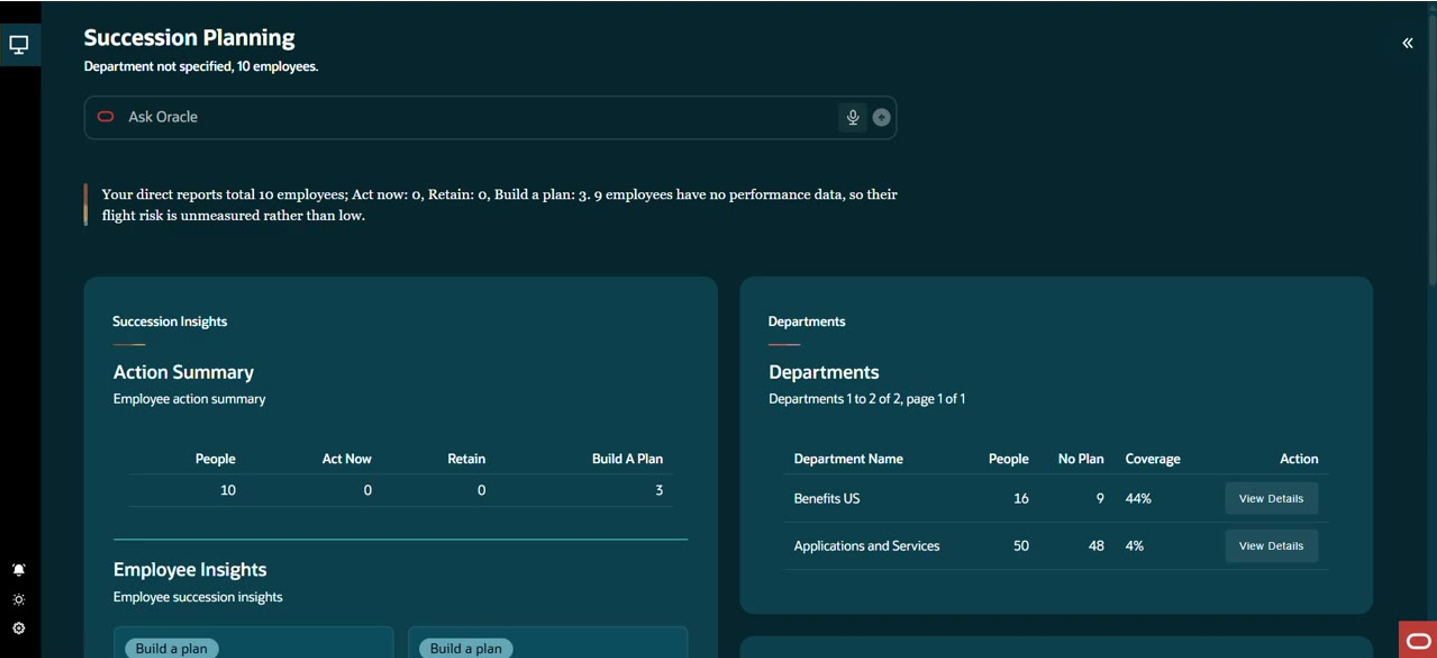 The Succession Planning workspace opens with an action summary, department coverage, and a plain-language headline of what needs attention.
Also Read – Procurement Transaction Intelligence – Agentic AI Application for Procurement Controls in Oracle Fusion
Key Features of the Succession Planning Agentic App
- Insights at a glance: The workspace opens with a headline summary of the team, for example how many employees fall into Act now, Retain, or Build a plan, and a clear warning when employees have no performance data, so their flight risk is unmeasured rather than low.
- Action Summary: A single table shows people, Act now, Retain, and Build a plan counts for the team in scope.
- Department Coverage: Each department shows headcount, how many people have no succession plan, and the resulting coverage percentage, with a View Details option to drill in.
- Employee Insights: Every employee appears as a card with a recommended action, flight risk percentage, plan coverage percentage, and the main driver, such as lowest grade among peers or a declining performance trajectory.
- Explainable Scoring: A View Reason option breaks down the flight risk and plan coverage scores into individual factors, each with its own weighting, so the recommendation is explainable and not a black box.
- Successor Recommendations: Find Successors lists potential internal candidates with their job title, shared skills, skill gaps, fit rationale, and recommended learning, with an Add Successor action.
- Ask Oracle: Questions such as which employees have no succession plan, or which employees would hurt most if they left, can be asked in plain English through the Ask Oracle bar.
- Ratings from Fusion: Manager-assigned risk of loss and impact of loss ratings from Fusion are displayed alongside the AI insights, with a clear note of how many employees still have no rating.
Workflow of the Application: A Day in the Life of a Manager Planning for Succession
The easiest way to see the app in action is to follow a manager through it. This manager leads a Benefits team and wants to know, before the next talent review, where the biggest succession risks are.
The workspace starts with what matters most
On opening the app, the manager does not have to build a report. The workspace summarises the team in a sentence, then shows the Action Summary and the department view side by side. In this example, Benefits US has 16 people, 9 of them with no succession plan, giving 44% coverage, while Applications and Services has 50 people and just 4% coverage.
A question answered in seconds
The manager asks Ask Oracle to show succession coverage for the team. The answer comes back immediately: 7 of 10 employees (70%) have a documented succession plan, each listed with the successor named, and the three employees who still need plans are called out at the bottom.
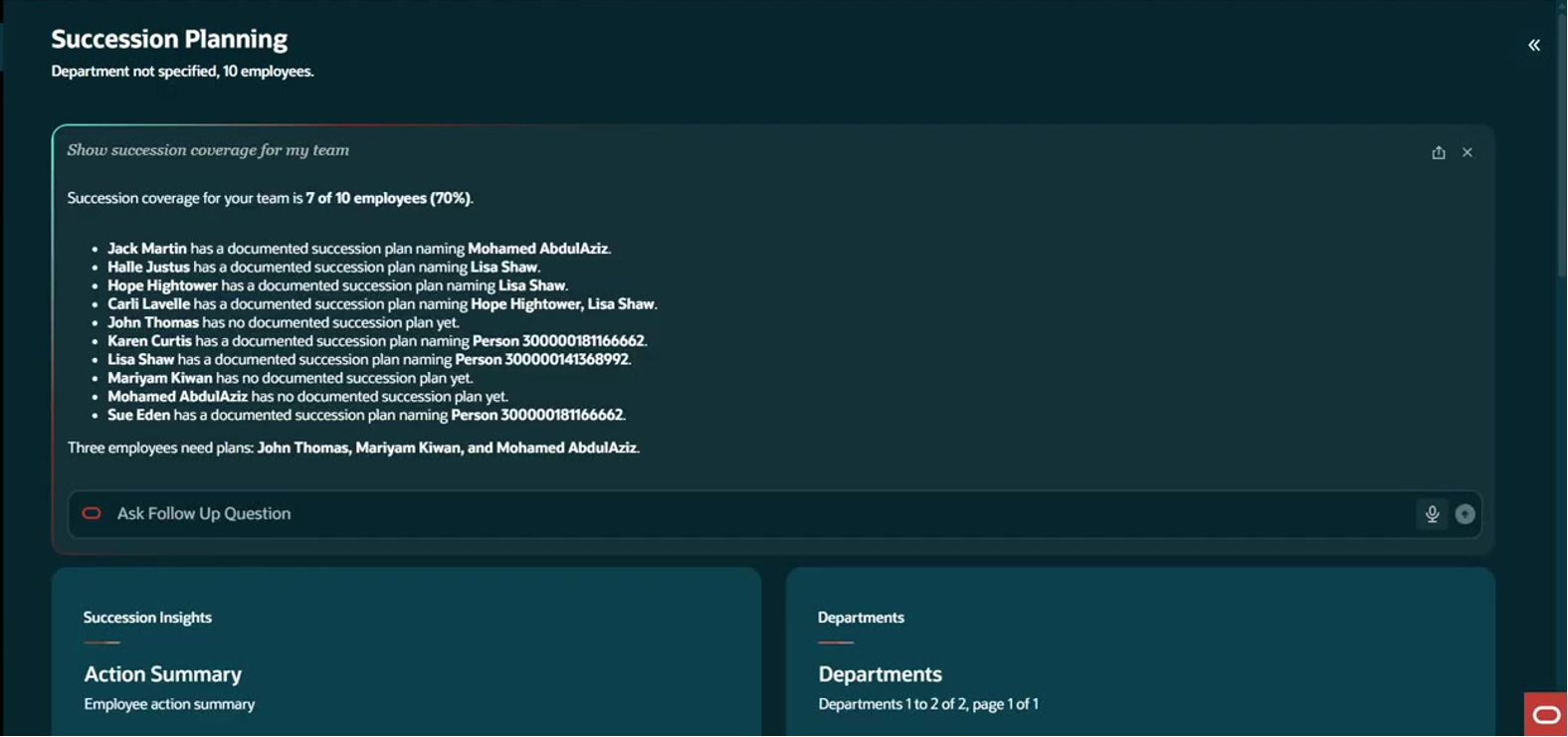 Ask Oracle returns team succession coverage, names each successor, and highlights who still needs a plan.
Employee insights sorted by recommended action
Drilling into the Benefits US department, the Employee Insights cards sort people by what the manager should do. Two employees are marked Act now. One has a 70% flight risk and only 11% plan coverage, as the lowest grade among three peers in the same job. Another has a 68% flight risk with a declining performance trajectory. Employees marked Retain show high flight risk but strong plan coverage, so the business is protected even if they leave.
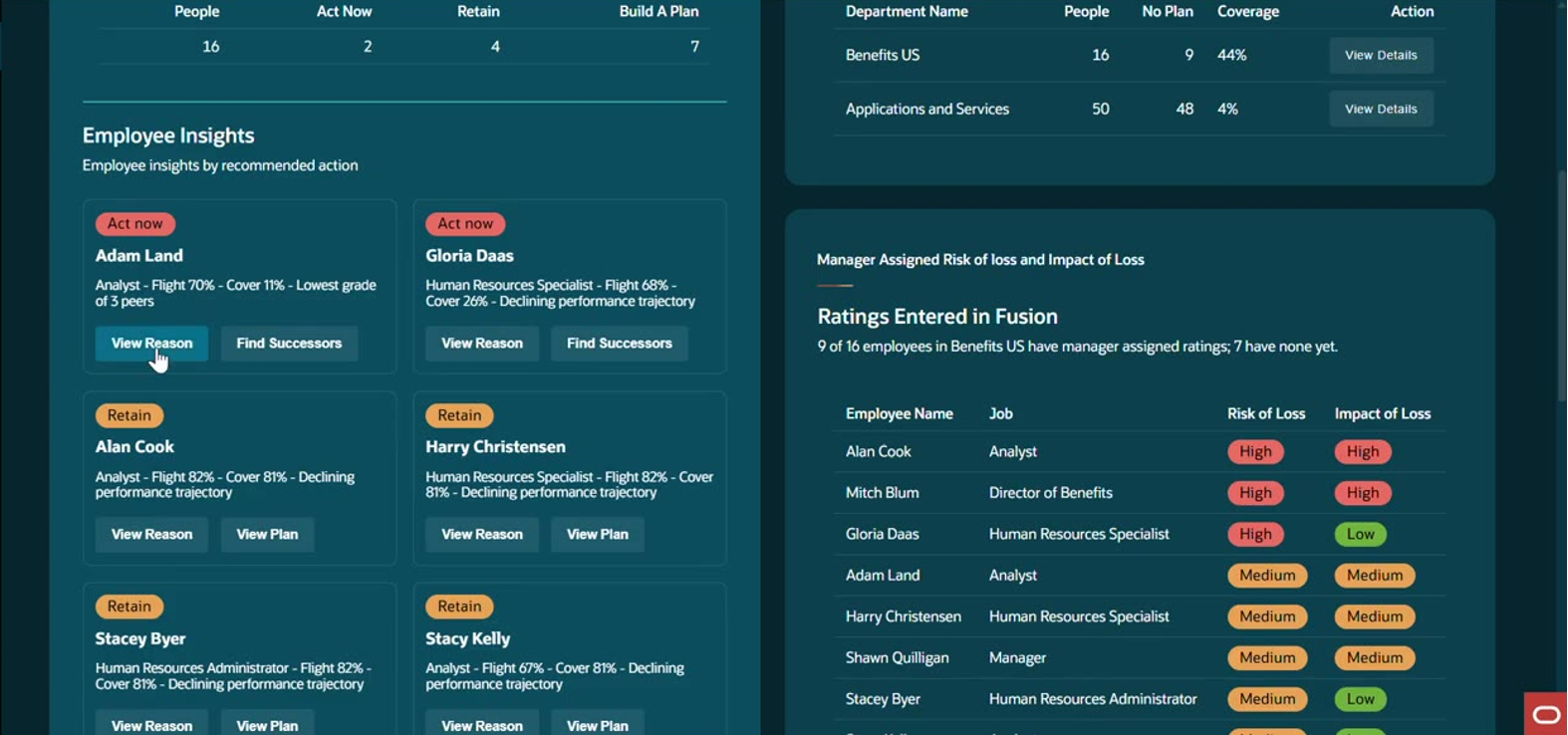 Employee cards show the recommended action, flight risk, plan coverage, and the main driver behind each recommendation.
View Reason: the why behind the score
Selecting View Reason opens a breakdown of the two scores. Flight risk is explained through factors such as grade against same-job peers, the manager’s span of control, and performance trajectory. Plan coverage is explained through whether a succession plan exists and whether there is a talent data blind spot, for example an employee with no performance rating on file. The app then states the recommended action and a suggested next step, such as holding a progression-focused conversation and beginning to identify a named successor.
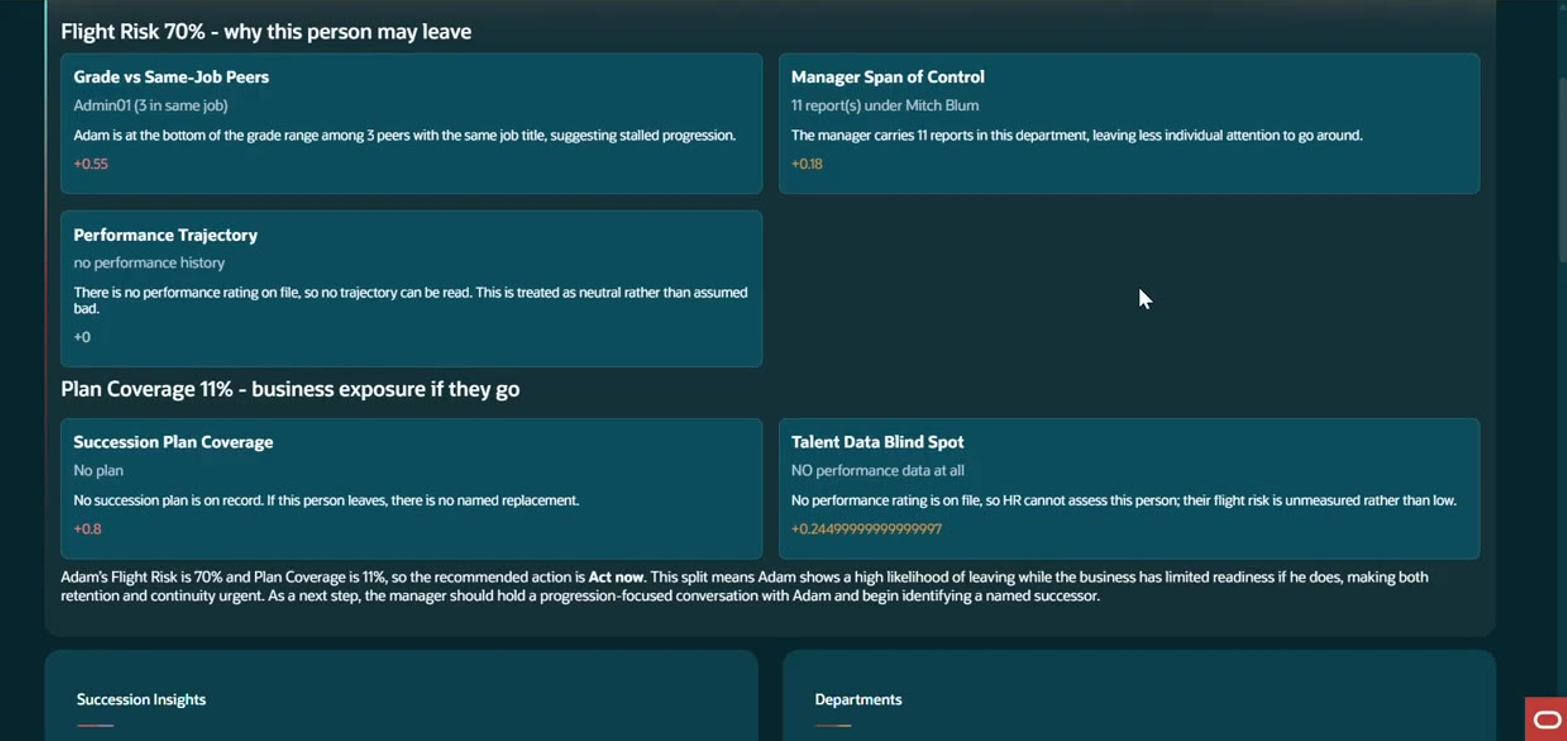 View Reason breaks flight risk and plan coverage into weighted factors, followed by a recommended action.
Find Successors without leaving the screen
For an employee with no plan, the manager selects Find Successors. The app lists potential internal candidates with their job title, shared skills, skill gaps, fit rationale, and recommended learning. Where profile data is thin, such as no skills recorded, the app says so plainly and explains that candidates were ranked on job title only, so the manager knows how much weight to give the suggestion. Each candidate has an Add Successor action.
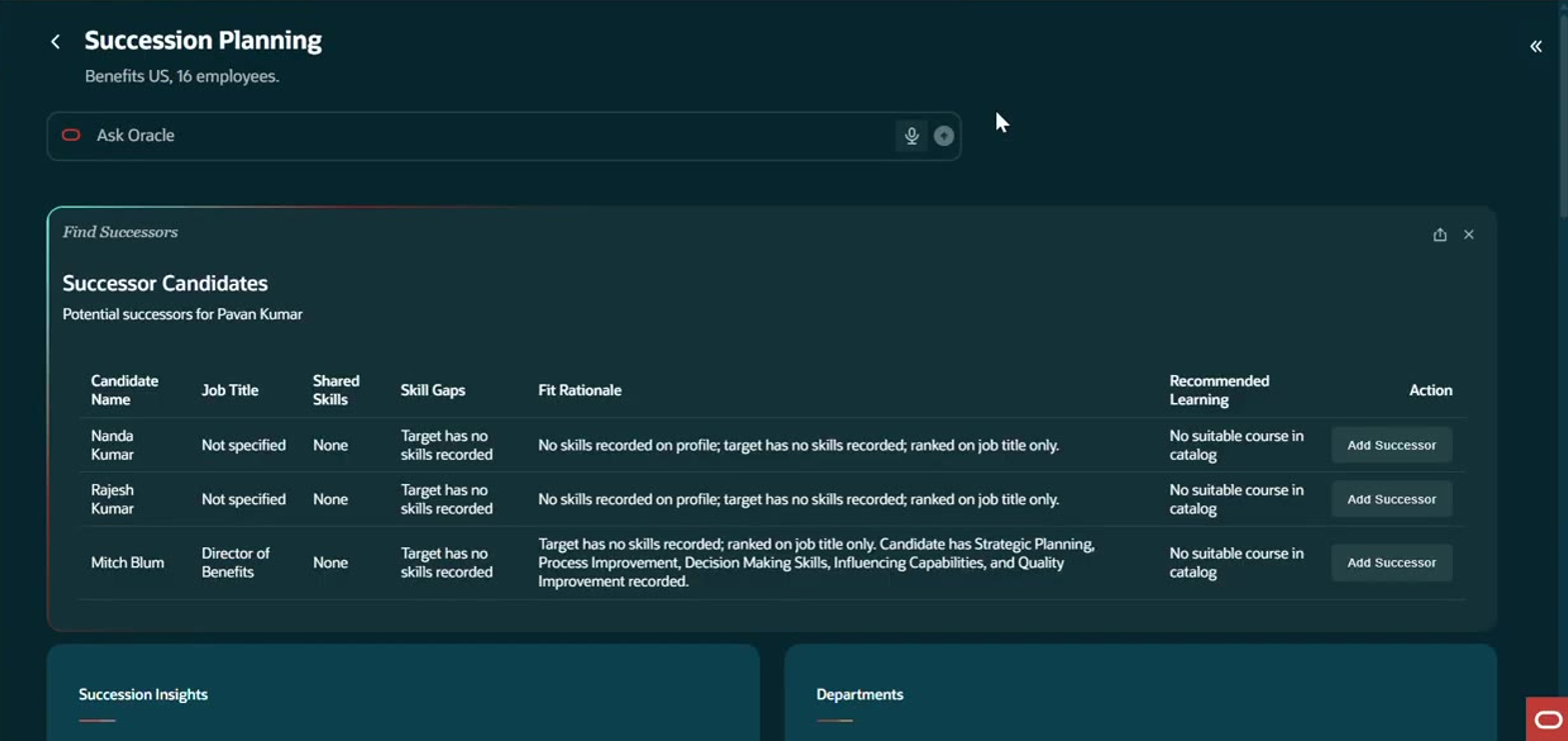 Successor candidates are listed with fit rationale and skill gaps and can be added directly from the screen.
Asking the questions managers actually ask
Beyond the dashboard, the manager can ask follow-up questions in plain English. Asking which employees have no succession plan returns a clear list of names.
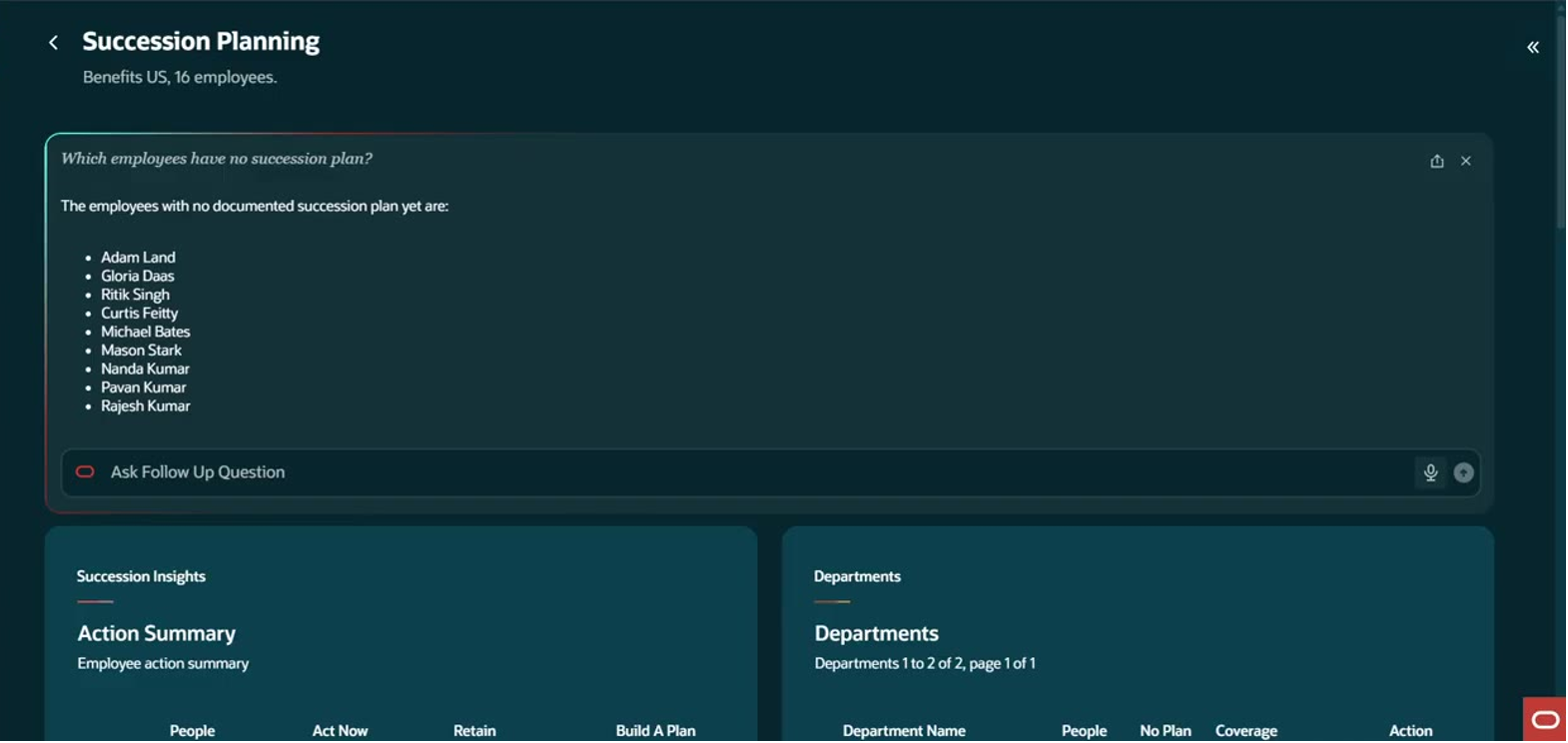 A plain-English question returns the list of employees with no documented succession plan.
Asking which employees would hurt the most if they left returns those rated High for impact of loss, along with their risk of loss, and shows how many employees in the department have manager-assigned ratings so far. In this example, 9 of 16 employees have ratings and 7 have none yet.
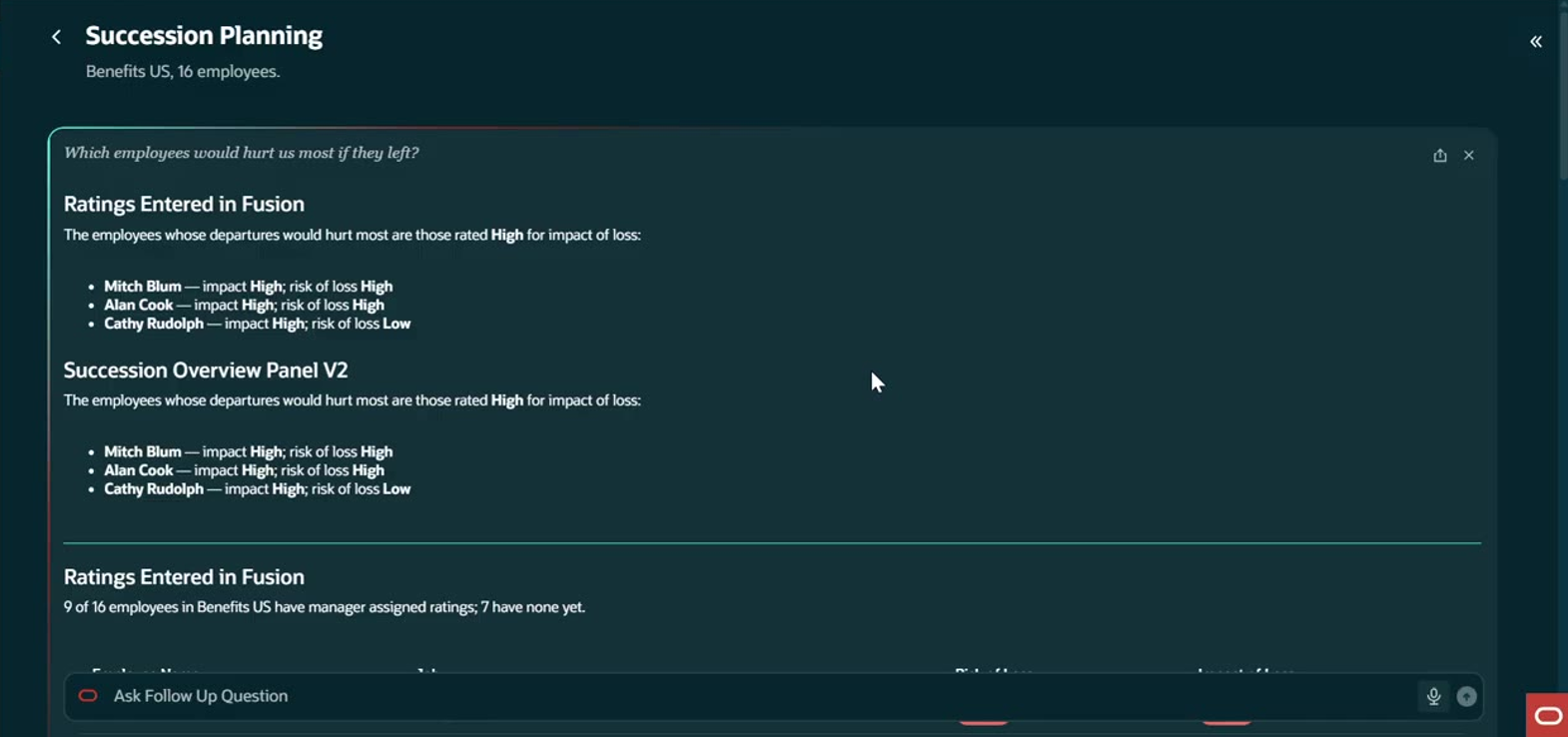 Impact of loss and risk of loss ratings from Fusion are combined to show where a departure would hurt most.
Clear boundaries when a question is out of scope
When the manager asks who could succeed someone who is not part of the department roster, the app does not guess. It states that the person is not part of the roster and that it cannot identify a successor, keeping its answers tied to data it actually has.
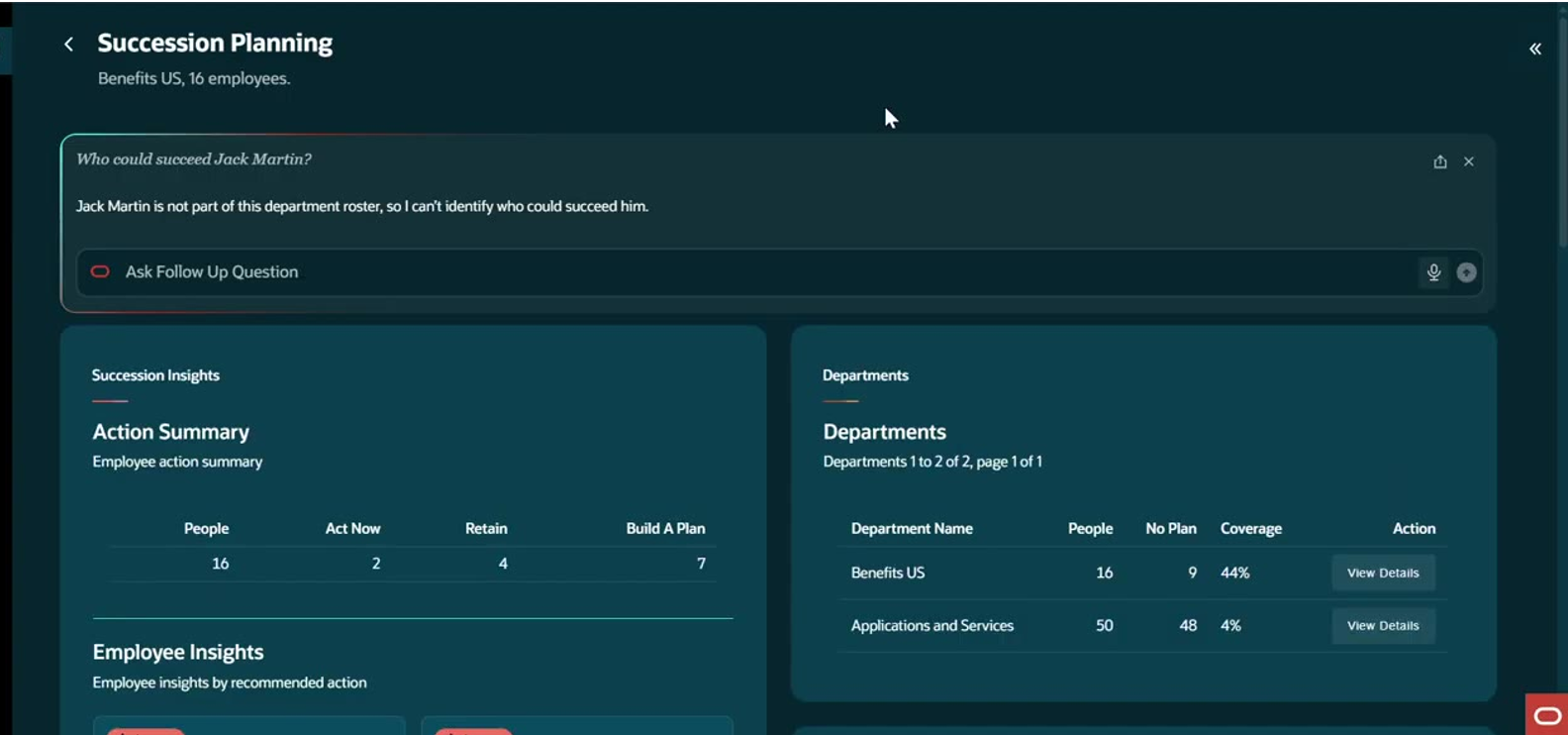 The app declines to answer for employees outside the roster instead of inventing an answer.
Reviewing an existing plan
For employees who already have a plan, View Plan shows the plan name, plan type, and status, for example a plan with a named successor, so the manager can confirm coverage before moving on.
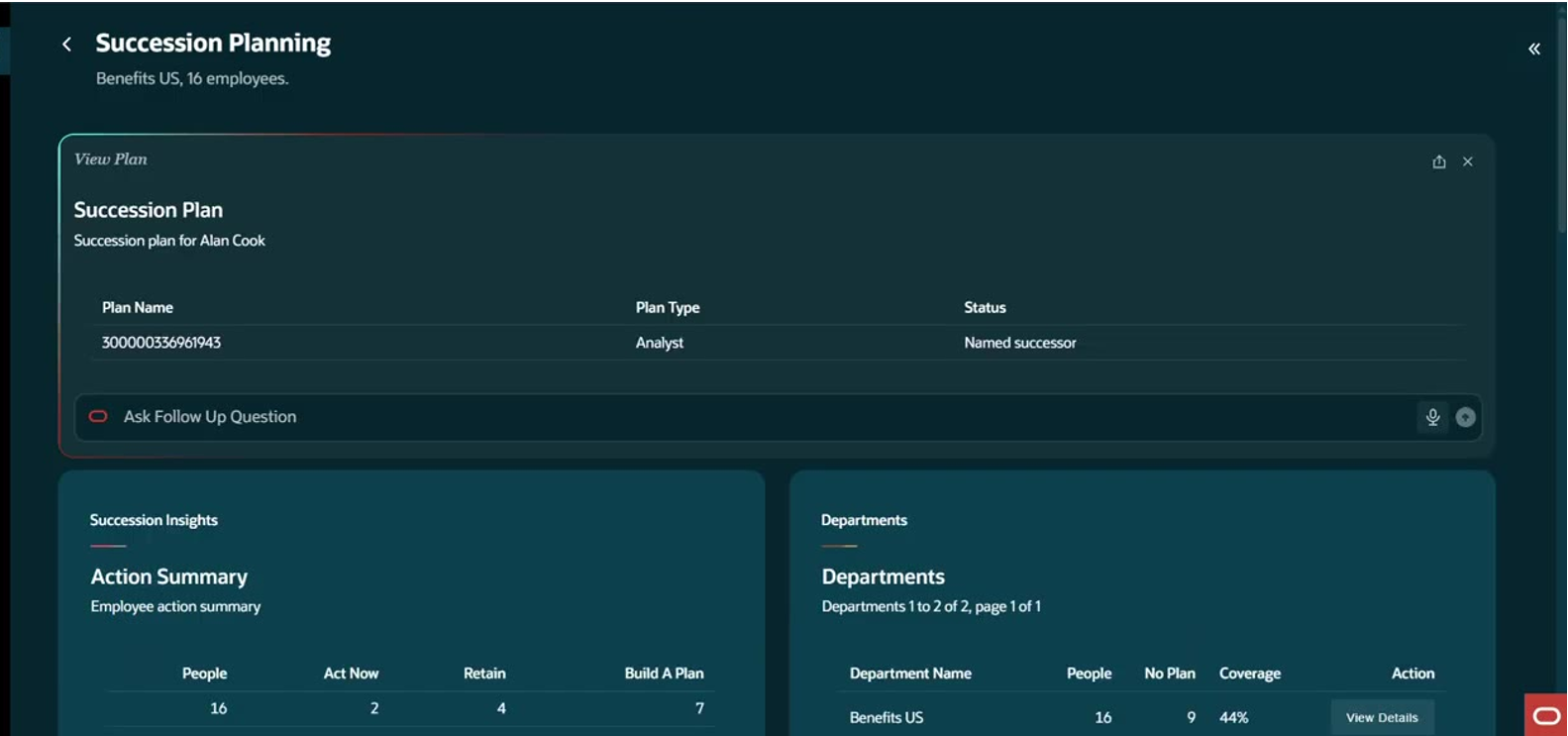 View Plan confirms the plan type and status for an employee who is already covered.
What used to take several reports and a manual cross-check is now a single workspace that flags who is at risk, explains why, and helps the manager act.
Built on Oracle Technology
The Succession Planning agentic app is built on the Oracle technologies below:
- Oracle Fusion Cloud HCM: The source of employee, job, grade, performance rating, and succession plan data.
- Oracle AI Agent Studio: Supports the agentic experience and the reasoning behind risk and recommendation scoring.
- Ask Oracle: Provides the natural language interface for succession questions.
Conclusion
Succession planning fails quietly. A plan that was never written, a rating that was never entered, or a high performer whose frustration nobody noticed rarely shows up until the resignation does. The Succession Planning agentic app is built to surface those gaps early. It scores flight risk and plan coverage together, explains every recommendation in plain language, and helps managers move from insight to action without leaving Oracle Fusion HCM.
As an Oracle Fusion Agentic Applications partner, Conneqtion Group designs agentic apps that work within an organisation’s existing Fusion investment. The Succession Planning agentic app brings that approach to talent continuity.
If your Oracle Fusion HCM is live and succession planning still depends on manual reports and spreadsheets, this app is worth a closer look. Conneqtion Group can walk you through a demo, including the action summary, View Reason breakdown, and successor recommendations. Request a demo to see it applied to your own workforce data.
Frequently Asked Questions (FAQs)
1. How does the app decide whether someone is a flight risk?
It combines several factors into a flight risk score, such as how the employee’s grade compares with peers in the same job, the manager’s span of control, and performance trajectory. The View Reason option shows each factor and its weighting, so managers can see exactly how the score was reached.
2. What happens when an employee has no performance rating?
The app does not treat missing data as low risk. It flags a talent data blind spot and notes that the employee’s flight risk is unmeasured rather than low, so the gap is visible and can be fixed.
3. Can managers act on the recommendations directly?
Yes. From the same screen, managers can review the reasoning, look up potential successors, add a successor, or view an existing plan.