Ask any Oracle Fusion consultant what slows down a go-live, and setup comes up fast. Payment terms, ledgers, tax rules, business units: none of it makes headlines, but one wrong setting turns into a misapplied invoice, a failed close or an awkward audit question weeks later.
The trouble is how setup gets done. Screen by screen, carried between environments by hand, and checked by whoever remembers to. AI can speed that up, but not if it means giving up control.
This blog shows how FSCR and agentic AI handle it, using a real example: creating a new Receivables payment term, from a plain-English request to the final check in Oracle Fusion.
FSCR at a glance
- A setup registry and method for Oracle Fusion
- AI agents that configure Fusion from plain-English inputs
- Gap checks on existing implementations
- Setup upgrades without the manual work
- Approval for every change, evidence for every step
What Is FSCR?
FSCR is a setup registry and method for configuring Oracle Fusion. Consultants use it to configure setup, find gaps in an existing implementation and upgrade it, while a set of AI agents does the heavy lifting based on the inputs they provide.
It isn’t an app that end users log in to. It’s a way of working for the consultants who configure and maintain Fusion.
- Configure: Setup is created from plain-English inputs, with a preview and approval before anything changes.
- Identify gaps: The current setup is read and summarised, so duplicates, unused items and oddities show up.
- Upgrade: Changes are prepared, applied and verified with far less manual effort.
Why Is Oracle Fusion Setup Hard to Control?
On the surface it looks simple: open a task, fill in a form, save. The real effort sits around the form. You need to know what already exists, make the change consistently, and prove afterwards that it landed as intended. That’s where three problems show up:
- Manual effort: Every change is keyed in page by page, which is slow and easy to get slightly wrong.
- Limited visibility: Knowing what’s configured means opening several setup pages and comparing them by eye.
- Thin evidence: Screenshots and notes show what someone remembers doing, not what the system actually accepted.
How FSCR Changes Oracle Fusion Setup
Fast AI alone fixes the speed problem and creates a trust problem. FSCR is built around both: agents understand the input, prepare the change, then stop wherever a person should decide. Here’s how that compares with manual setup.
| Area | Manual setup | With FSCR |
| Requirement | Interpreted and keyed into setup pages. | Written as a plain-English input. |
| Current state | Found by opening setup pages one by one. | Read from an export of the current setup and summarised. |
| Change preview | Often none before the change is saved. | A normalised design and the exact import preview are shown before loading. |
| Approval | Informal and hard to trace. | Explicit approval before the design is accepted and again before upload. |
| Verification | A spot check in the screen. | A fresh export compared with the approved file, with mismatches counted. |
| Evidence | Screenshots and notes. | Status and process logs kept in the project. |
Different roles benefit from the same approach:
Implementation Consultants: Configure, review, and upgrade Oracle Fusion setups with automated workflows, reducing repetitive manual effort.
Oracle Fusion Application Administrators: Maintain application configurations, ensure consistency across environments, and manage setup changes with better visibility, approvals, and verification.
Project Managers and Governance Leads: Gain visibility into configuration progress, approval records, validation results, and audit evidence.
Key Capabilities of FSCR
- Plain-English inputs: Describe the requirement the way you would to a colleague. No forms, no file formats to learn.
- Design and import preview: See the normalised design and the exact import preview before anything loads.
- Approval at every step: Confirm the design first, then approve the validated file again before upload. They are two separate decisions.
- Repeatable load files: The load file is built twice and must give the same SHA-256 fingerprint, so the approved file is the file that loads.
- Independent verification: After the import, a fresh export from Fusion is compared line by line with the approved file.
Workflow of FSCR: A Day in the Life of an Oracle Fusion Functional Consultant
The easiest way to see FSCR is to follow a consultant through it. Meet Arjun, a Receivables functional consultant on a Fusion implementation. Finance has asked for a new payment term, Net 20, for a proof of concept. He needs to add it and show afterwards that it landed exactly as requested, without keying it in screen by screen.
A request that starts in plain English
Arjun doesn’t open a setup page. He describes the requirement to FSCR the way he’d explain it to a colleague and asks to see the design and the exact import preview before anything loads.
“Create ONE new Receivables payment term: Name FSCR_NET20, description ‘FSCR PoC – Net 20’, reference data set COMMON, start date today, no end date, one instalment of 100% due in 20 days, no discount, no credit check, not a prepayment term. Show me the normalized design and the exact import preview before anything is loaded. Do not load yet.”
Before designing anything, FSCR has already read the current setup: 17 payment terms, only six in use, discounts on just two, a likely duplicate pair of Net 30 terms and a couple of items worth checking. Arjun knows what he’s adding to.
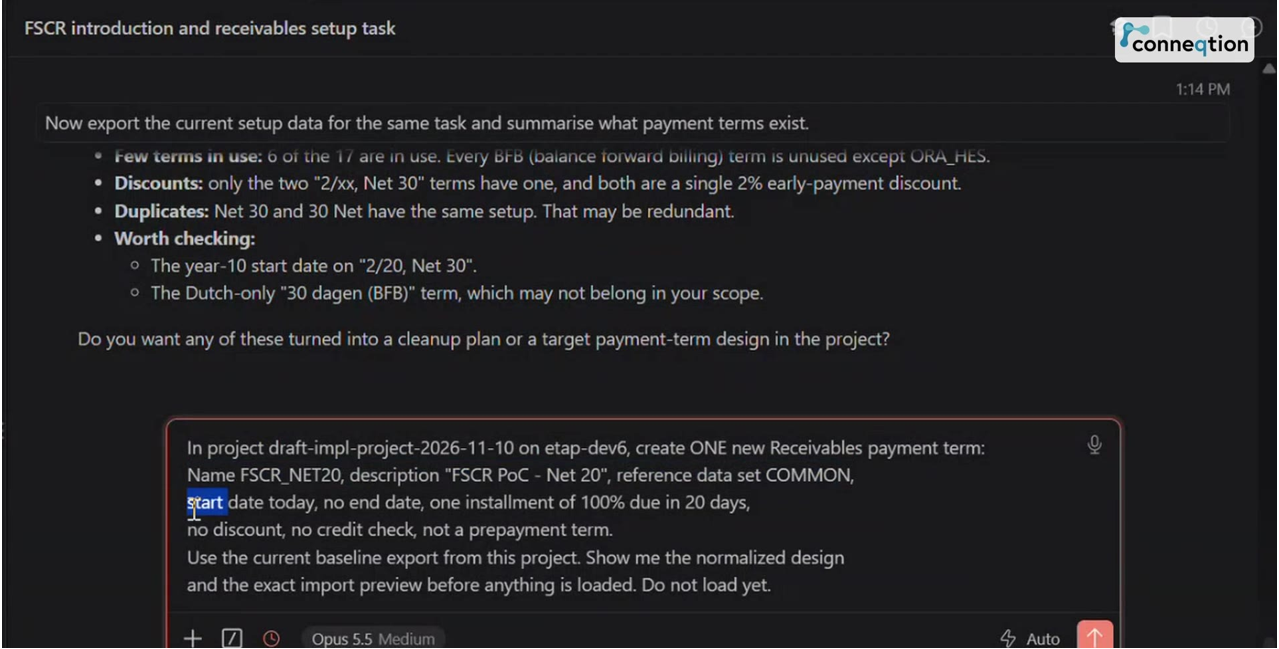 The requirement is written in plain English, with a clear instruction not to load anything yet.
He sees the exact design before anything is built
FSCR returns the normalised design and saves the preview. It asks for one thing, a confirmation, and that approves this exact design only, not an import. Once Arjun confirms, FSCR builds the load file twice and checks that both builds give the same SHA-256 fingerprint. If he changes the request, a new preview is needed.
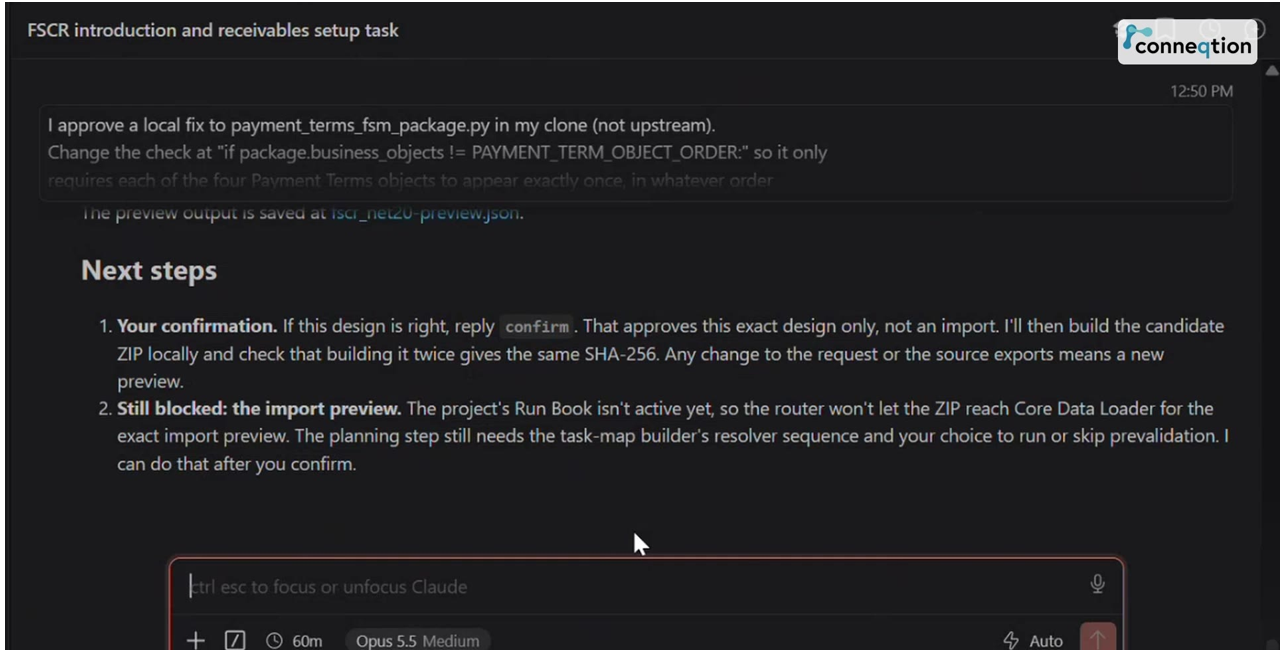 Confirming the design approves that exact design only, and any change to the request means a new preview.
A small issue is raised, not hidden
Midway, FSCR finds that a helper script insists on a fixed order for the four payment term objects, even though order doesn’t matter. It doesn’t quietly work around it. It explains the problem and proposes a fix, and Arjun approves it for his local copy only, so nothing upstream is touched.
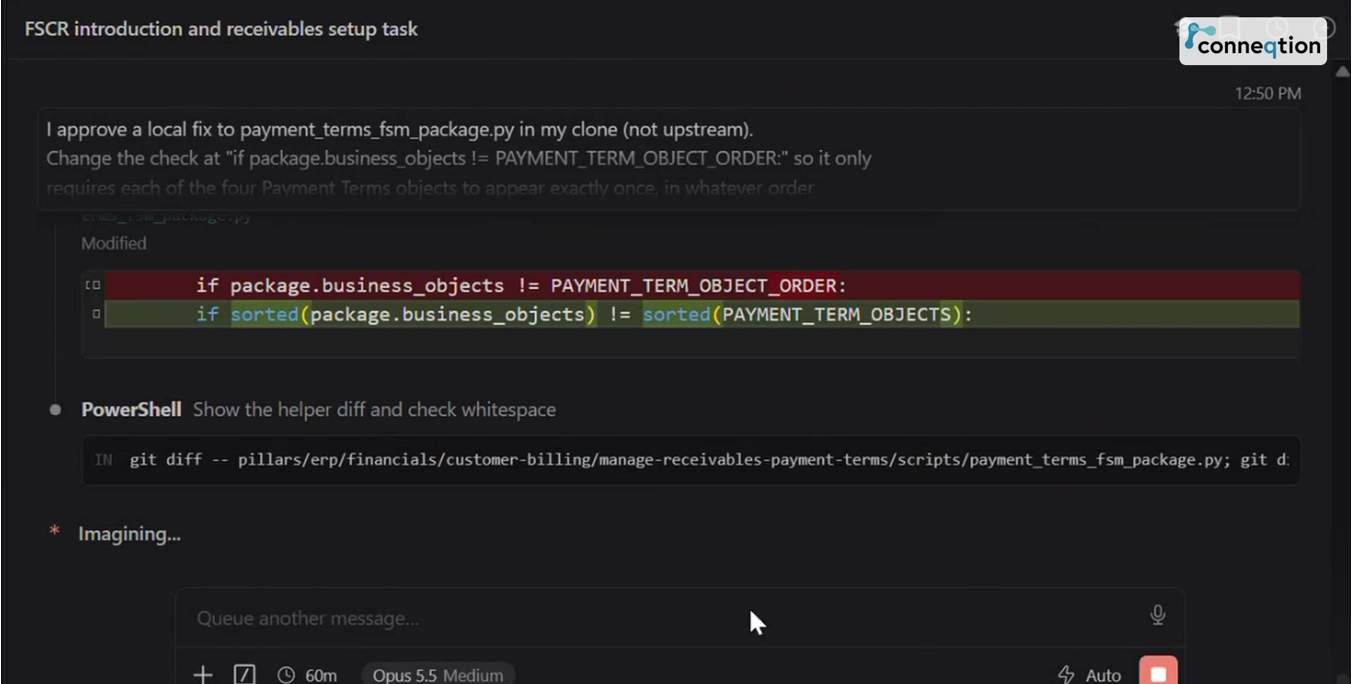 FSCR proposes a small local fix and applies it only after approval.
The work is planned as a Run Book
Next, FSCR plans the work as a Run Book mapped to the Manage Receivables Payment Terms task. Before creating anything, it flags something Arjun would otherwise find out too late: the Run Book takes its name from the project name and can’t be changed once it exists in Fusion. He renames the project first.
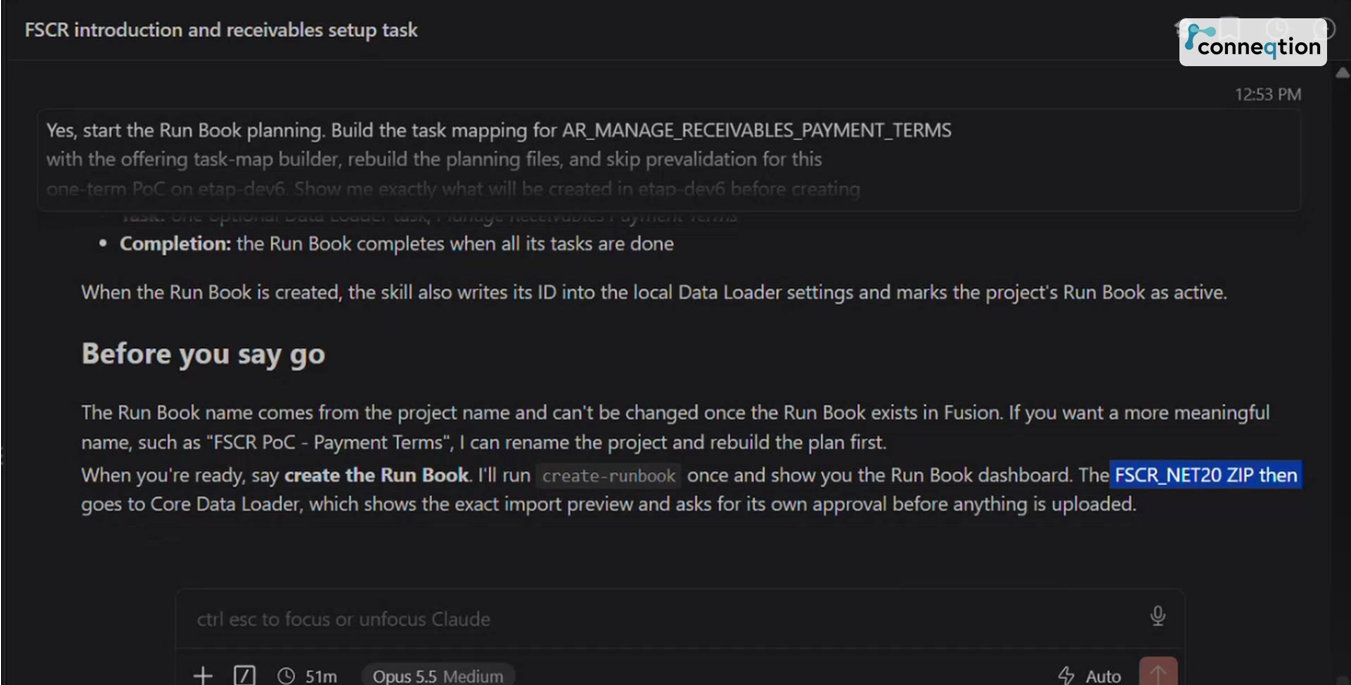 The Run Book payload is reviewed before it is created, including the naming detail that cannot be changed later.
The Run Book is then created in Oracle Fusion under Financials, Customer Billing, with one task not yet started. The first attempt stops at sign-in because the previous day’s token has expired, and FSCR says so instead of carrying on.
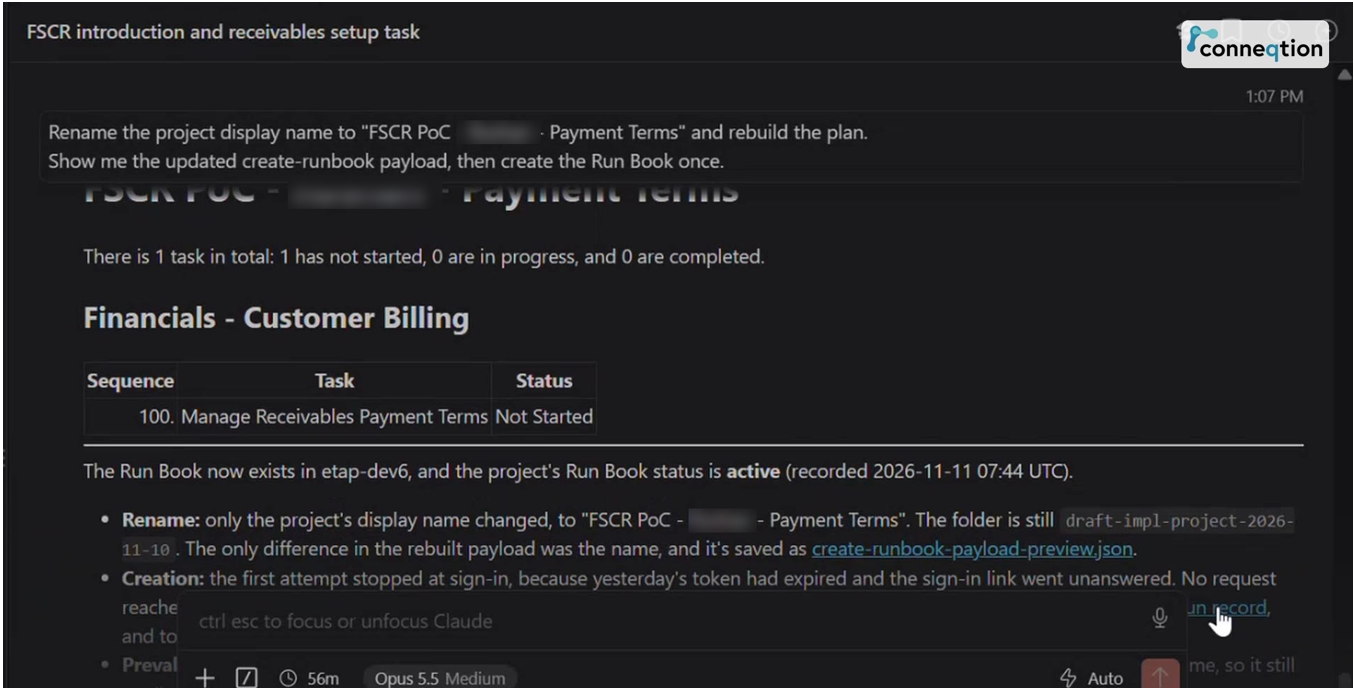 The Run Book now exists in Fusion, with a single task, Manage Receivables Payment Terms.
Validation passes, but nothing is uploaded yet
Arjun asks FSCR to hand the file to Core Data Loader and show the exact import preview, with one condition: no upload until he approves. The file passes validation, and the screen says it plainly: no data was uploaded. The upload starts only when Arjun approves this exact validated load.
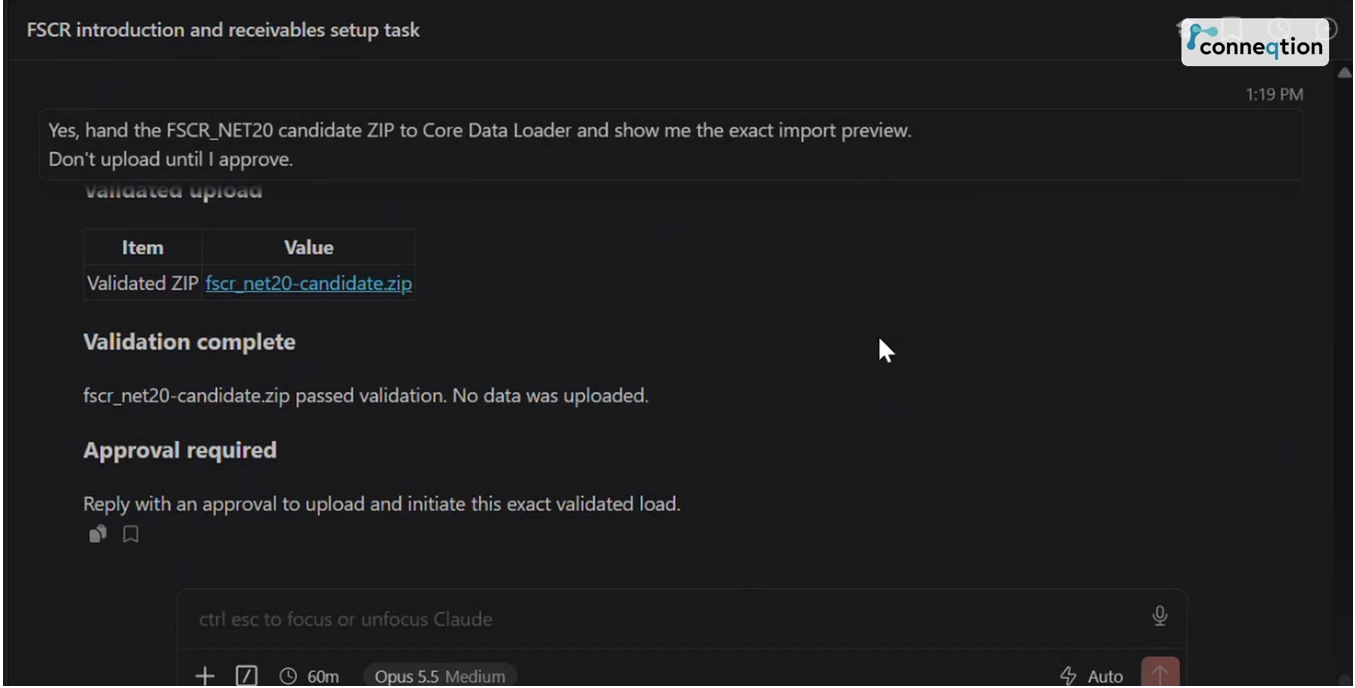 Validation passes, nothing is uploaded, and FSCR waits for approval.
The import succeeds, and FSCR says what it hasn’t verified yet
The load status shows three rows loaded (the header, the installment line and the US translation), none failed, and a process log saved. FSCR is just as clear about what it doesn’t know yet. The term isn’t marked verified, because that needs a fresh export from Fusion, which starts another process. So it asks for Arjun’s go-ahead.
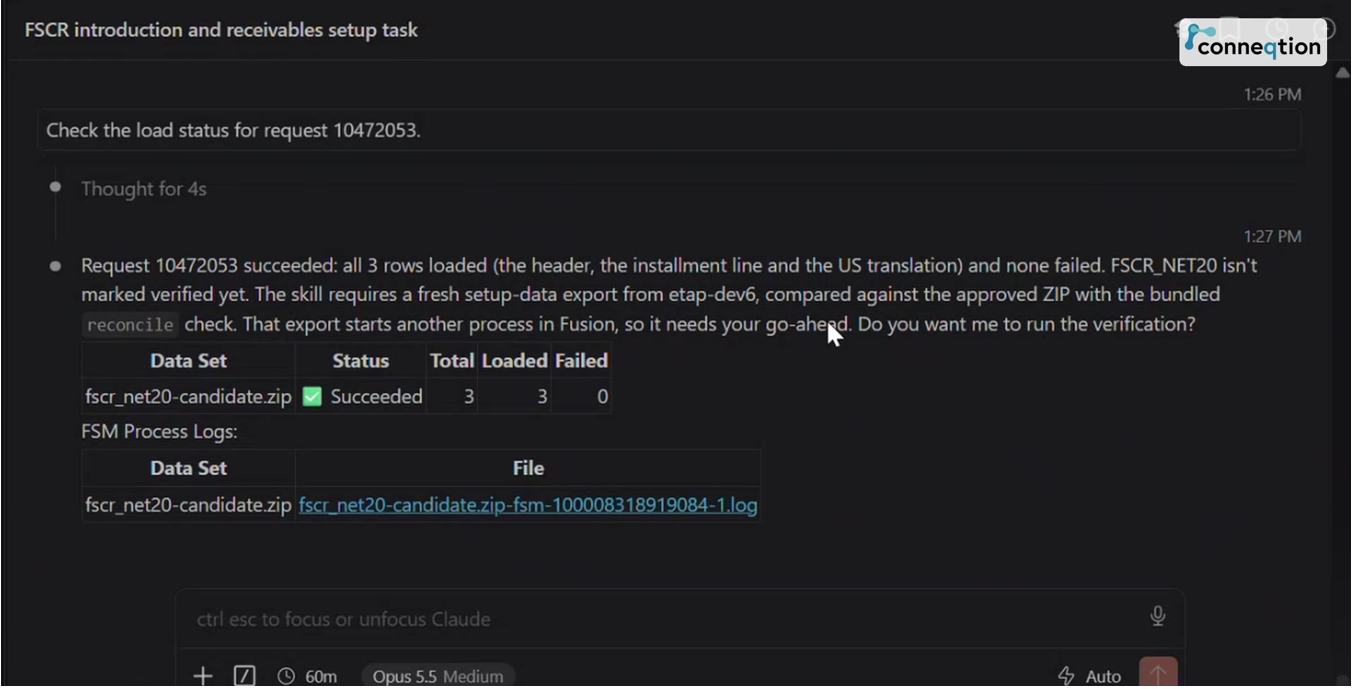 Three rows loaded, none failed, and verification still pending.
Verification against a fresh export
With the go-ahead, FSCR takes a fresh export of Manage Receivables Payment Terms and compares it with the approved file, saving the evidence in the project. Six completion checks run and all pass: the uploaded file matches the approved fingerprint, the load finished successfully, three rows loaded with no failures or warnings, status and logs are saved, the export contains FSCR_NET20 in the COMMON set, and the reconcile check reports zero mismatches across the term, installment line, translations and discounts.
One detail shows why independent checking matters. Fusion added 29 translation rows for other languages, copied from the US row, so the term now has 30 against the one that was sent. The reconcile check expects this and doesn’t flag it.
Six checks pass, and the reconcile check reports zero mismatches against the fresh export.
A last look in Oracle Fusion itself
Finally, Arjun opens Oracle Fusion. In Setup and Maintenance, under Manage Receivables Payment Terms, FSCR_NET20 sits in the list with the existing terms.
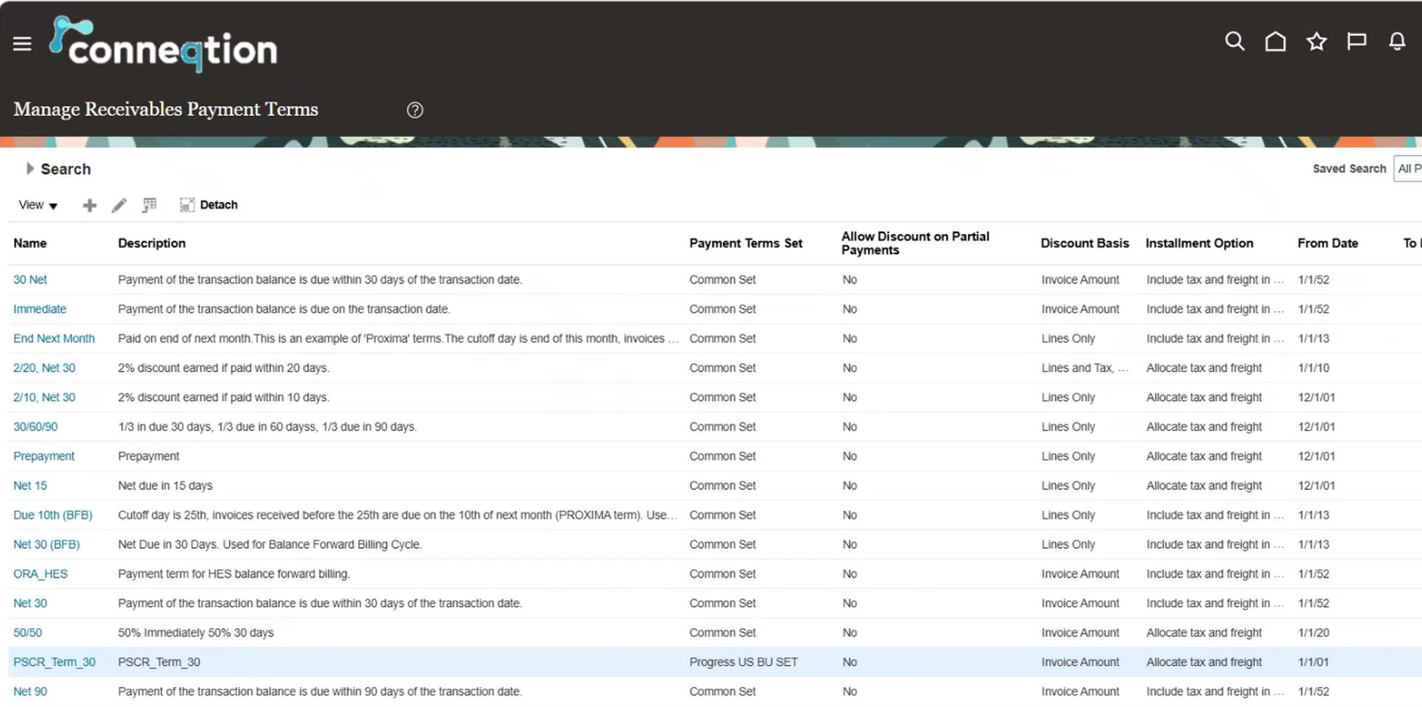
FSCR_NET20 appears in the Common set in Manage Receivables Payment Terms.
Opening it, everything matches the request: name and description, a base amount of 100, and a single installment of 100 due in 20 days, with no discount, credit check or prepayment.
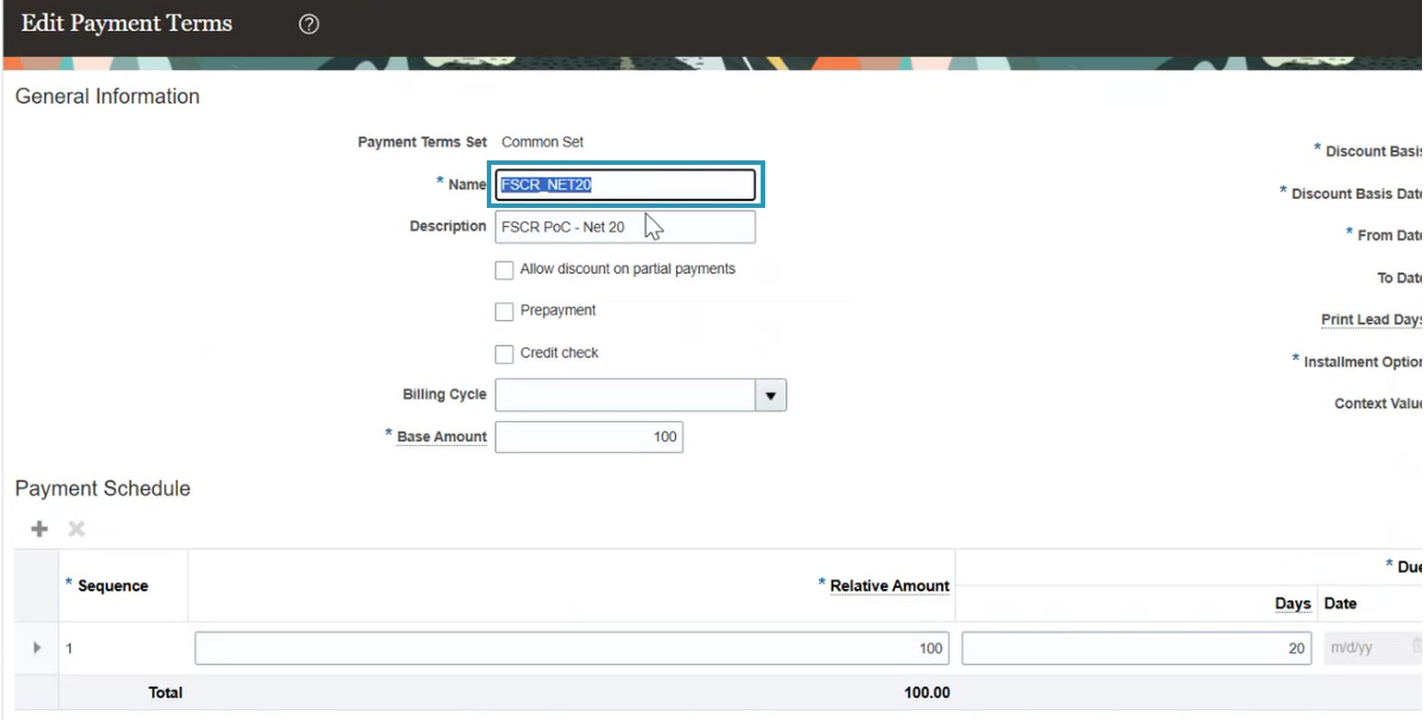
One installment of 100 due in 20 days, exactly as requested.
What used to mean keying a term in page by page and checking it by eye is now a plain-English request, a preview, an approval at each step and a verified result, with the evidence kept in the project.
Built on Oracle Technology
The demo uses these Oracle technologies:
- Oracle Fusion Cloud Financials (Receivables): Where the payment term is configured and verified.
- Setup and Maintenance: Where the Manage Receivables Payment Terms task lives and the result is confirmed.
- Core Data Loader: Validates the load file, previews the import and uploads after approval.
- Fusion Setup Manager (FSM): Runs the import and keeps the process logs used as evidence.
- Run Books: Plans the work as a tracked task mapped to the relevant setup task.
Conclusion
Setup is where an Oracle Fusion project is won or lost, and it’s where speed and control usually get traded off. FSCR’s idea is that you shouldn’t have to choose. The AI agents handle preparation, checking and paperwork. People make the decisions that matter.
The payment term here is deliberately small. The pattern is the point: a clear input, an exact preview, an approval at each step, and a result verified against the system itself.
Want to see FSCR on your own setup tasks? Conneqtion Group can walk you through it, from configuration and gap checks to upgrades, with approvals and evidence built in. Request a demo and we’ll show you how it works on your Fusion setup.
Frequently Asked Questions (FAQs)
1. Is FSCR an application for end users?
No. It’s a way for consultants to configure and maintain Oracle Fusion. In the demo, a consultant gives a plain-English input and FSCR carries out the setup, with approvals along the way.
2. Does FSCR change anything in Oracle Fusion without approval?
No. The design is confirmed before the load file is built, the validated file is approved again before upload, and the final verification asks for a go-ahead because it starts another process in Fusion.
3. How do I know the load worked?
FSCR takes a fresh export from Oracle Fusion and compares it with the approved file. In the demo, six completion checks passed and the reconcile check found zero mismatches, with status and logs kept in the project.